We've captured the moments from FabCon & SQLCon that everyone is talking about, and we are bringing them to the community, live and on-demand. Starts on April 14th. Register now
Hi,
I am trying to create a stacked graph of a running total, but I am having great problems.
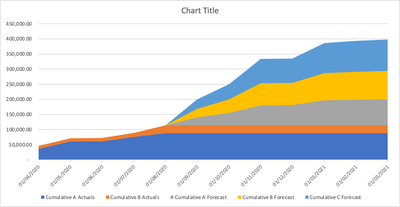
What i am trying to get is a graph like this:
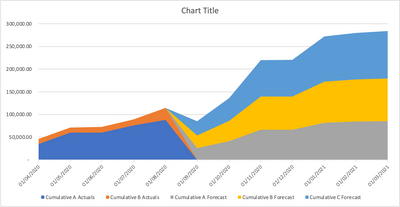
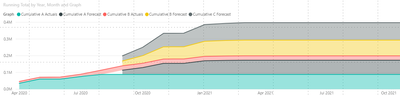
but i am getting this:
I have a sample PBIX file here:
Grateful if someone can help me please
Solved! Go to Solution.
Hi @timknox ,
Please try this:
Create a new date table:
Date = CALENDARAUTO()
Create a measure:
Running Total =
CALCULATE(
SUM(Sheet1[Value]),FILTER(ALL('Date'),'Date'[Date]<=MAX('Date'[Date])))
@timknox , try a measure like
CALCULATE(
SUM(Sheet1[Value]),FILTER(ALL(Sheet1),Sheet1[Date]<=MAX(Sheet1[Date])))
In case you want all only date. Move that to a separate table or use date table
CALCULATE(
SUM(Sheet1[Value]),FILTER(ALL(DAte),DAte[Date]<=MAX(DAte[Date])))
Hi @timknox ,
Please try this:
Create a new date table:
Date = CALENDARAUTO()
Create a measure:
Running Total =
CALCULATE(
SUM(Sheet1[Value]),FILTER(ALL('Date'),'Date'[Date]<=MAX('Date'[Date])))
If you have recently started exploring Fabric, we'd love to hear how it's going. Your feedback can help with product improvements.
A new Power BI DataViz World Championship is coming this June! Don't miss out on submitting your entry.
| User | Count |
|---|---|
| 57 | |
| 40 | |
| 36 | |
| 18 | |
| 18 |
| User | Count |
|---|---|
| 69 | |
| 64 | |
| 38 | |
| 34 | |
| 23 |