cancel
Showing results for 
Search instead for 
Did you mean: 

Data Days is here! Join us now for 60+ days of learning, challenges, and connection. Learn more

Reply
timknox
Helper II
Helper II

Running Total Problem

Hi,

I am trying to create a stacked graph of a running total, but I am having great problems.


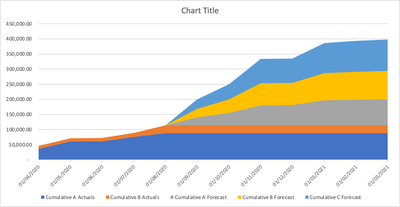
What i am trying to get is a graph like this:


timknox_0-1600343866350.png

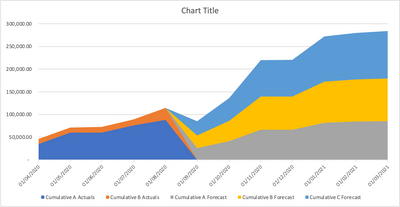
but i am getting this:

timknox_1-1600343901530.png


I have a sample PBIX file here:


Grateful if someone can help me please

1 ACCEPTED SOLUTION

Hi @timknox ,


Please try this:


Create a new date table:

Date = CALENDARAUTO()

Create a measure:


Running Total = 
CALCULATE(
	SUM(Sheet1[Value]),FILTER(ALL('Date'),'Date'[Date]<=MAX('Date'[Date])))


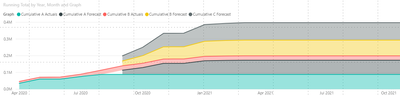
v-xuding-msft_0-1602142827873.png


Best Regards,
Xue Ding
If this post helps, then please consider Accept it as the solution to help the other members find it more quickly.

View solution in original post

3 REPLIES 3
amitchandak
Super User
Super User

@timknox , try a measure like


CALCULATE(
	SUM(Sheet1[Value]),FILTER(ALL(Sheet1),Sheet1[Date]<=MAX(Sheet1[Date])))


In case you want all only date. Move that to a separate table or use date table


CALCULATE(
	SUM(Sheet1[Value]),FILTER(ALL(DAte),DAte[Date]<=MAX(DAte[Date])))


Share with Power BI Enthusiasts: Full Power BI Video (20 Hours) YouTube
Microsoft Fabric Series 60+ Videos YouTube
Microsoft Fabric Hindi End to End YouTube


thanks for this but i tried that as per the example PBIX.....


any ideas?

Hi @timknox ,


Please try this:


Create a new date table:

Date = CALENDARAUTO()

Create a measure:


Running Total = 
CALCULATE(
	SUM(Sheet1[Value]),FILTER(ALL('Date'),'Date'[Date]<=MAX('Date'[Date])))


v-xuding-msft_0-1602142827873.png


Best Regards,
Xue Ding
If this post helps, then please consider Accept it as the solution to help the other members find it more quickly.

Helpful resources

Announcements
Fabric Data Days is here Carousel

Fabric Data Days 2026

Don't miss out on Data Days, June 15 through August 7. Learn Fabric, Power BI, SQL, AI and more.

May Power BI Update Carousel

Power BI Monthly Update - May 2026

Check out the May 2026 Power BI update to learn about new features.

Power BI DataViz World Championships carousel

Power BI DataViz World Championships - June 2026

A new Power BI DataViz World Championship is coming this June! Don't miss out on submitting your entry.