Get certified for free when you join Fabric Data Days 2026 and dive into Fabric, Power BI, SQL, AI, and other essential data skills.
Join nowTry your skills in the Power BI Dataviz World Championship! Round one ends June 26. Join now
Hi All,
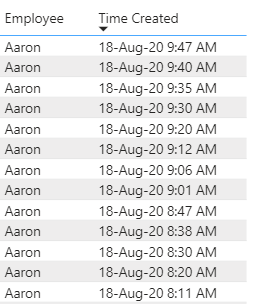
I am trying to show the time difference between 'Time Created' by Employee. I have found solutions that use a calculated column, but I am using a direct query to a SQL server and this seems to prevent me from being able to use calculated columns.
The new column will show 7 min, 5 min, 5 min, etc.
Any help would be appreciated!
Solved! Go to Solution.
@Anonymous , You will not be able to create a column as earlier is not supported.
Try a measure like this
diff =
maxx(summarize(Table, Table[Employee], Table[time created],"_1",
max(Table[time created]) -maxx(filter(allselected(Table), Table[employee] =max(Table[employee]) && Table[time created] <max(Table[time created])),Table[time created])
),[_1])
This should work with the employee and time created. See if this can work for you
Few supported column I covered in playlist - https://www.youtube.com/watch?v=My0bLn9voo4&list=PLPaNVDMhUXGbKatyDdOhGbTL3xW2Xy6pA
@Anonymous
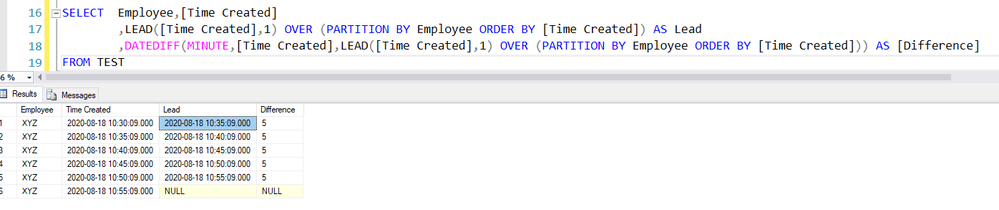
Alternate Solution in SQL using the Lead function and later Date Difference as follows
1. LEAD([Time Created],1) OVER (PARTITION BY Employee ORDER BY [Time Created]) AS Lead
2. DATEDIFF(MINUTE,[Time Created],LEAD([Time Created],1) OVER (PARTITION BY Employee ORDER BY [Time Created])) AS [Difference]
@Anonymous , You will not be able to create a column as earlier is not supported.
Try a measure like this
diff =
maxx(summarize(Table, Table[Employee], Table[time created],"_1",
max(Table[time created]) -maxx(filter(allselected(Table), Table[employee] =max(Table[employee]) && Table[time created] <max(Table[time created])),Table[time created])
),[_1])
This should work with the employee and time created. See if this can work for you
Few supported column I covered in playlist - https://www.youtube.com/watch?v=My0bLn9voo4&list=PLPaNVDMhUXGbKatyDdOhGbTL3xW2Xy6pA
| User | Count |
|---|---|
| 23 | |
| 19 | |
| 19 | |
| 17 | |
| 11 |
| User | Count |
|---|---|
| 55 | |
| 54 | |
| 40 | |
| 40 | |
| 30 |