cancel
Showing results for 
Search instead for 
Did you mean: 

July 7 - July 17 | Round 2 of the Power BI Dataviz World Championships. Don't miss your chance! Learn more

Reply
Anonymous
Not applicable

Return Previous Row's Data, Direct Query SQL

Hi All,


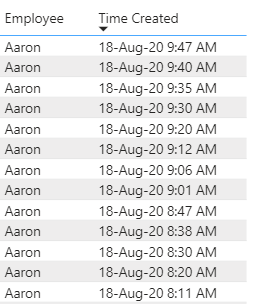
I am trying to show the time difference between 'Time Created' by Employee. I have found solutions that use a calculated column, but I am using a direct query to a SQL server and this seems to prevent me from being able to use calculated columns.


The new column will show 7 min, 5 min, 5 min, etc.

thomas_p_1-1597759100955.png


Any help would be appreciated!


1 ACCEPTED SOLUTION
amitchandak
Super User
Super User

@Anonymous , You will not be able to create a column as earlier is not supported.

Try a measure like this

diff =
maxx(summarize(Table, Table[Employee], Table[time created],"_1",
max(Table[time created]) -maxx(filter(allselected(Table), Table[employee] =max(Table[employee]) && Table[time created] <max(Table[time created])),Table[time created])
),[_1])


This should work with the employee and time created. See if this can work for you

Few supported column I covered in playlist - https://www.youtube.com/watch?v=My0bLn9voo4&list=PLPaNVDMhUXGbKatyDdOhGbTL3xW2Xy6pA


Share with Power BI Enthusiasts: Full Power BI Video (20 Hours) YouTube
Microsoft Fabric Series 60+ Videos YouTube
Microsoft Fabric Hindi End to End YouTube

View solution in original post

3 REPLIES 3
lit2018pbi
Resolver II
Resolver II

@Anonymous 

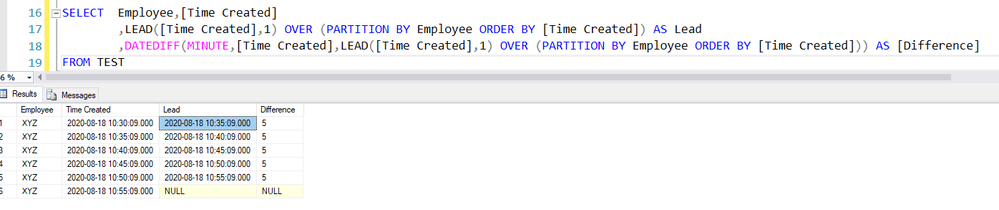
Alternate Solution in SQL using the Lead function and later Date Difference as follows

1. LEAD([Time Created],1) OVER (PARTITION BY Employee ORDER BY [Time Created]) AS Lead
2. DATEDIFF(MINUTE,[Time Created],LEAD([Time Created],1) OVER (PARTITION BY Employee ORDER BY [Time Created])) AS [Difference]


lead.PNG


amitchandak
Super User
Super User

@Anonymous , You will not be able to create a column as earlier is not supported.

Try a measure like this

diff =
maxx(summarize(Table, Table[Employee], Table[time created],"_1",
max(Table[time created]) -maxx(filter(allselected(Table), Table[employee] =max(Table[employee]) && Table[time created] <max(Table[time created])),Table[time created])
),[_1])


This should work with the employee and time created. See if this can work for you

Few supported column I covered in playlist - https://www.youtube.com/watch?v=My0bLn9voo4&list=PLPaNVDMhUXGbKatyDdOhGbTL3xW2Xy6pA


Share with Power BI Enthusiasts: Full Power BI Video (20 Hours) YouTube
Microsoft Fabric Series 60+ Videos YouTube
Microsoft Fabric Hindi End to End YouTube
Anonymous
Not applicable

@amitchandak thank you, this works exactly how I need it to!

Helpful resources

Announcements
FabCon and SQLCon Barcelona 2026

FabCon & SQLCon – Barcelona 2026

Join us in Barcelona for FabCon and SQLCon, the Fabric, Power BI, SQL, and AI community event. Save €200 with code FABCMTY200.

60 days of Data Days Carousel

Data Days 2026

Join Fabric Data Days 2026: 60 days of free live/on-demand sessions, challenges, study groups, and certification opportunities.

Power BI DataViz World Championships carousel

Power BI DataViz World Championships - June 2026

A new Power BI DataViz World Championship is coming this June! Don't miss out on submitting your entry.