cancel
Showing results for 
Search instead for 
Did you mean: 

Data Days is here! Join us now for 60+ days of learning, challenges, and connection. Learn more

Reply
Anonymous
Not applicable

Return Previous Row's Data, Direct Query SQL

Hi All,


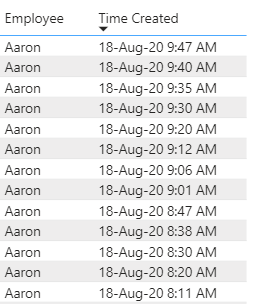
I am trying to show the time difference between 'Time Created' by Employee. I have found solutions that use a calculated column, but I am using a direct query to a SQL server and this seems to prevent me from being able to use calculated columns.


The new column will show 7 min, 5 min, 5 min, etc.

thomas_p_1-1597759100955.png


Any help would be appreciated!


1 ACCEPTED SOLUTION
amitchandak
Super User
Super User

@Anonymous , You will not be able to create a column as earlier is not supported.

Try a measure like this

diff =
maxx(summarize(Table, Table[Employee], Table[time created],"_1",
max(Table[time created]) -maxx(filter(allselected(Table), Table[employee] =max(Table[employee]) && Table[time created] <max(Table[time created])),Table[time created])
),[_1])


This should work with the employee and time created. See if this can work for you

Few supported column I covered in playlist - https://www.youtube.com/watch?v=My0bLn9voo4&list=PLPaNVDMhUXGbKatyDdOhGbTL3xW2Xy6pA


Share with Power BI Enthusiasts: Full Power BI Video (20 Hours) YouTube
Microsoft Fabric Series 60+ Videos YouTube
Microsoft Fabric Hindi End to End YouTube

View solution in original post

3 REPLIES 3
lit2018pbi
Resolver II
Resolver II

@Anonymous 

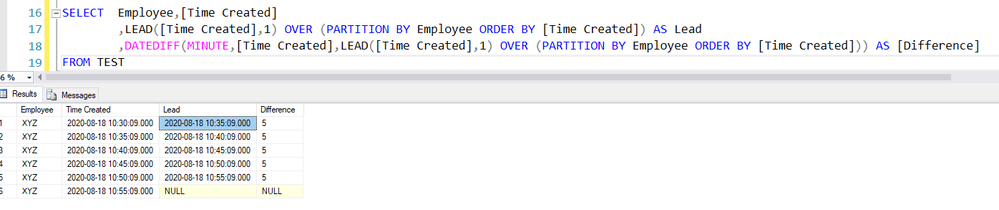
Alternate Solution in SQL using the Lead function and later Date Difference as follows

1. LEAD([Time Created],1) OVER (PARTITION BY Employee ORDER BY [Time Created]) AS Lead
2. DATEDIFF(MINUTE,[Time Created],LEAD([Time Created],1) OVER (PARTITION BY Employee ORDER BY [Time Created])) AS [Difference]


lead.PNG


amitchandak
Super User
Super User

@Anonymous , You will not be able to create a column as earlier is not supported.

Try a measure like this

diff =
maxx(summarize(Table, Table[Employee], Table[time created],"_1",
max(Table[time created]) -maxx(filter(allselected(Table), Table[employee] =max(Table[employee]) && Table[time created] <max(Table[time created])),Table[time created])
),[_1])


This should work with the employee and time created. See if this can work for you

Few supported column I covered in playlist - https://www.youtube.com/watch?v=My0bLn9voo4&list=PLPaNVDMhUXGbKatyDdOhGbTL3xW2Xy6pA


Share with Power BI Enthusiasts: Full Power BI Video (20 Hours) YouTube
Microsoft Fabric Series 60+ Videos YouTube
Microsoft Fabric Hindi End to End YouTube
Anonymous
Not applicable

@amitchandak thank you, this works exactly how I need it to!

Helpful resources

Announcements
Fabric Data Days is here Carousel

Fabric Data Days 2026

Don't miss out on Data Days, June 15 through August 7. Learn Fabric, Power BI, SQL, AI and more.

May Power BI Update Carousel

Power BI Monthly Update - May 2026

Check out the May 2026 Power BI update to learn about new features.

Power BI DataViz World Championships carousel

Power BI DataViz World Championships - June 2026

A new Power BI DataViz World Championship is coming this June! Don't miss out on submitting your entry.