cancel
Showing results for 
Search instead for 
Did you mean: 

Try your skills in the Power BI Dataviz World Championship! Round one ends June 26. Join now

Reply
jaafer
Frequent Visitor

Retrieve latest date

Hi  

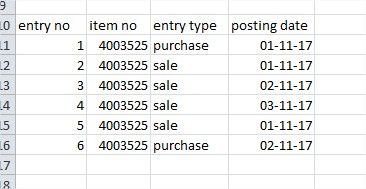
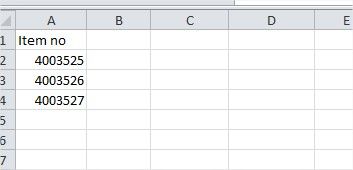
I am new to power bi.  I have two tables  like  table 1  "item master" and table 2 "item ledger" i want to create a new column for "last sale date"  Please help me to create a lookup column in item table.  Picture attacheditem ledger.jpgitem table.jpg


2 ACCEPTED SOLUTIONS
Anonymous
Not applicable

Hi @jaafer,


You can simply  use summarize function to create a table to store summarized 'item no' and max 'post date'.

Table =
SUMMARIZE (
    FILTER ( 'Sample', [entry type] = "sale" ),
    [item no],
    "MaxDate", MAX ( 'Sample'[posting date] )
)

Regards,

Xiaoxin Sheng

View solution in original post

Anonymous
Not applicable

HI @jaafer,


Nope, it not in query editor, it is dax formula.


You can navigate to modify tab and choose new table, then input these to formula panel.

16.PNG


Regards,

Xiaoxin Sheng

View solution in original post

6 REPLIES 6
jaafer
Frequent Visitor

i want to retrieve the latest date from "posting date" field and from "entry type" field equals to "sale".  Thanks.

Anonymous
Not applicable

Hi @jaafer,


You can simply  use summarize function to create a table to store summarized 'item no' and max 'post date'.

Table =
SUMMARIZE (
    FILTER ( 'Sample', [entry type] = "sale" ),
    [item no],
    "MaxDate", MAX ( 'Sample'[posting date] )
)

Regards,

Xiaoxin Sheng

Thank you very much brother,  it worked well...  Smiley Happy

@Anonymous  ok I  got it.. how to create a table.  Actually i need to add a new column in table "item master" with a field " last sale date"  Can u please help

Thank you very much for reply. Can you please tell me where i will apply this code. Is it in query editor. Please I am very new to Power Bi

Anonymous
Not applicable

HI @jaafer,


Nope, it not in query editor, it is dax formula.


You can navigate to modify tab and choose new table, then input these to formula panel.

16.PNG


Regards,

Xiaoxin Sheng

Helpful resources

Announcements
Fabric Data Days is here Carousel

Data Days 2026

Don't miss out on Data Days, June 15 through August 7. Learn Fabric, Power BI, SQL, AI and more.

Power BI DataViz World Championships carousel

Power BI DataViz World Championships - June 2026

A new Power BI DataViz World Championship is coming this June! Don't miss out on submitting your entry.