Advance your Data & AI career with 50 days of live learning, dataviz contests, hands-on challenges, study groups & certifications and more!
Get registeredGet Fabric Certified for FREE during Fabric Data Days. Don't miss your chance! Request now
Hi
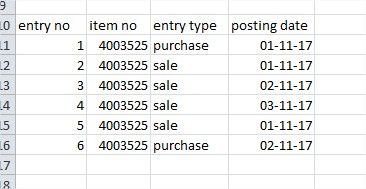
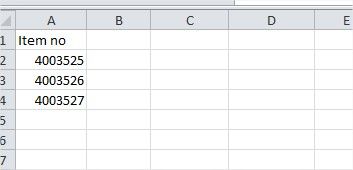
I am new to power bi. I have two tables like table 1 "item master" and table 2 "item ledger" i want to create a new column for "last sale date" Please help me to create a lookup column in item table. Picture attached
Solved! Go to Solution.
Hi @jaafer,
You can simply use summarize function to create a table to store summarized 'item no' and max 'post date'.
Table =
SUMMARIZE (
FILTER ( 'Sample', [entry type] = "sale" ),
[item no],
"MaxDate", MAX ( 'Sample'[posting date] )
)
Regards,
Xiaoxin Sheng
HI @jaafer,
Nope, it not in query editor, it is dax formula.
You can navigate to modify tab and choose new table, then input these to formula panel.
Regards,
Xiaoxin Sheng
i want to retrieve the latest date from "posting date" field and from "entry type" field equals to "sale". Thanks.
Hi @jaafer,
You can simply use summarize function to create a table to store summarized 'item no' and max 'post date'.
Table =
SUMMARIZE (
FILTER ( 'Sample', [entry type] = "sale" ),
[item no],
"MaxDate", MAX ( 'Sample'[posting date] )
)
Regards,
Xiaoxin Sheng
Thank you very much brother, it worked well... ![]()
@Anonymous ok I got it.. how to create a table. Actually i need to add a new column in table "item master" with a field " last sale date" Can u please help
Thank you very much for reply. Can you please tell me where i will apply this code. Is it in query editor. Please I am very new to Power Bi
HI @jaafer,
Nope, it not in query editor, it is dax formula.
You can navigate to modify tab and choose new table, then input these to formula panel.
Regards,
Xiaoxin Sheng
Advance your Data & AI career with 50 days of live learning, contests, hands-on challenges, study groups & certifications and more!
Check out the October 2025 Power BI update to learn about new features.