cancel
Showing results for 
Search instead for 
Did you mean: 

Data Days is here! Join us now for 60+ days of learning, challenges, and connection. Learn more

Reply
mokhan
Frequent Visitor

Report

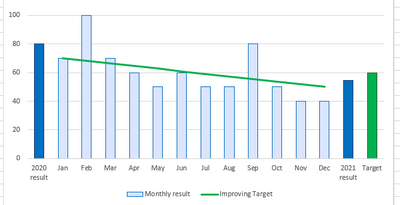
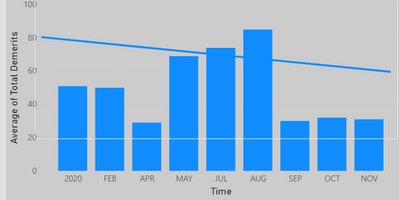
I have Montly data bars on my bar graph and I would like to display bar with current year average and a custome value bar of target at the end, how can I achieve this.


Thankyou!

1 ACCEPTED SOLUTION
v-alq-msft
Community Support
Community Support

Hi, @mokhan 


Based on your description, I created data to reproduce your scenario. The pbix file is attached in the end.

Table:
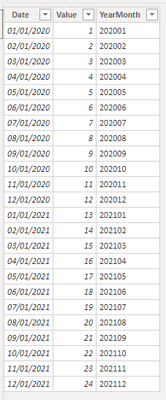
b1.png


Table 2(a calculated table):

Table 2 = 
UNION(
    DISTINCT('Table'[YearMonth]),
    ROW("YearMonth","2020-Avg"),
    ROW("YearMonth","2021-Avg"),
    ROW("YearMonth","Target")
)


You may two measures as below.

Result = 
SWITCH(
    MAX('Table 2'[YearMonth]),
    "2020-Avg",
    CALCULATE(
        AVERAGE('Table'[Value]),
        FILTER(
            ALL('Table'),
            YEAR([Date])=2020
        )
    ),
    "2021-Avg",
    CALCULATE(
        AVERAGE('Table'[Value]),
        FILTER(
            ALL('Table'),
            YEAR([Date])=2021
        )
    ),
    "Target",12,
    CALCULATE(
        SUM('Table'[Value]),
        FILTER(
            ALL('Table'),
            [YearMonth]=MAX('Table 2'[YearMonth])
        )
    )
)
Color Control = 
SWITCH(
    MAX('Table 2'[YearMonth]),
    "2020-Avg","yellow",
    "2021-Avg","red",
    "Target","green"
)


Then you may use 'YearMonth' from 'Table 2' as 'Shared axis' and apply conditional format based on 'Color Control'.

Result:
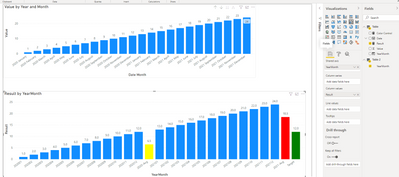
b2.png


Best Regards

Allan


If this post helps, then please consider Accept it as the solution to help the other members find it more quickly.

View solution in original post

5 REPLIES 5
v-alq-msft
Community Support
Community Support

Hi, @mokhan 


Based on your description, I created data to reproduce your scenario. The pbix file is attached in the end.

Table:

b1.png


Table 2(a calculated table):

Table 2 = 
UNION(
    DISTINCT('Table'[YearMonth]),
    ROW("YearMonth","2020-Avg"),
    ROW("YearMonth","2021-Avg"),
    ROW("YearMonth","Target")
)


You may two measures as below.

Result = 
SWITCH(
    MAX('Table 2'[YearMonth]),
    "2020-Avg",
    CALCULATE(
        AVERAGE('Table'[Value]),
        FILTER(
            ALL('Table'),
            YEAR([Date])=2020
        )
    ),
    "2021-Avg",
    CALCULATE(
        AVERAGE('Table'[Value]),
        FILTER(
            ALL('Table'),
            YEAR([Date])=2021
        )
    ),
    "Target",12,
    CALCULATE(
        SUM('Table'[Value]),
        FILTER(
            ALL('Table'),
            [YearMonth]=MAX('Table 2'[YearMonth])
        )
    )
)
Color Control = 
SWITCH(
    MAX('Table 2'[YearMonth]),
    "2020-Avg","yellow",
    "2021-Avg","red",
    "Target","green"
)


Then you may use 'YearMonth' from 'Table 2' as 'Shared axis' and apply conditional format based on 'Color Control'.

Result:

b2.png


Best Regards

Allan


If this post helps, then please consider Accept it as the solution to help the other members find it more quickly.

mokhan
Frequent Visitor

I need this

mokhan_0-1611571852953.png


So far I got this

mokhan_1-1611571910608.png


mokhan
Frequent Visitor

Need to add current year avg and target bar at the end.


AllisonKennedy
Community Champion
Community Champion

@mokhan  You will need to do a lot of manual work/calculations to achieve this. Would you settle for using the Line Column combo chart and putting the custom target value as a line value? 


Or you could even use the Analytics features to set custom target as constant line and average for current year: 


https://docs.microsoft.com/en-us/power-bi/transform-model/desktop-analytics-pane


Please @mention me in your reply if you want a response.

Copying DAX from this post? Click here for a hack to quickly replace it with your own table names

Has this post solved your problem? Please Accept as Solution so that others can find it quickly and to let the community know your problem has been solved.
If you found this post helpful, please give Kudos C

I work as a Microsoft trainer and consultant, specialising in Power BI and Power Query.
www.excelwithallison.com

amitchandak
Super User
Super User

@mokhan ,Can you share sample data and sample output in table format? Or a sample pbix after removing sensitive data.

Share with Power BI Enthusiasts: Full Power BI Video (20 Hours) YouTube
Microsoft Fabric Series 60+ Videos YouTube
Microsoft Fabric Hindi End to End YouTube

Helpful resources

Announcements
Fabric Data Days is here Carousel

Fabric Data Days 2026

Don't miss out on Data Days, June 15 through August 7. Learn Fabric, Power BI, SQL, AI and more.

May Power BI Update Carousel

Power BI Monthly Update - May 2026

Check out the May 2026 Power BI update to learn about new features.

Power BI DataViz World Championships carousel

Power BI DataViz World Championships - June 2026

A new Power BI DataViz World Championship is coming this June! Don't miss out on submitting your entry.