This time we’re going bigger than ever. Fabric, Power BI, SQL, AI and more. We're covering it all. You won't want to miss it.
Learn moreDid you hear? There's a new SQL AI Developer certification (DP-800). Start preparing now and be one of the first to get certified. Register now
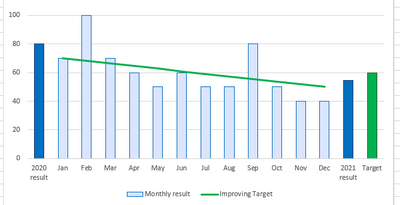
I have Montly data bars on my bar graph and I would like to display bar with current year average and a custome value bar of target at the end, how can I achieve this.
Thankyou!
Solved! Go to Solution.
Hi, @mokhan
Based on your description, I created data to reproduce your scenario. The pbix file is attached in the end.
Table:
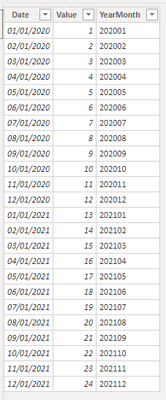
Table 2(a calculated table):
Table 2 =
UNION(
DISTINCT('Table'[YearMonth]),
ROW("YearMonth","2020-Avg"),
ROW("YearMonth","2021-Avg"),
ROW("YearMonth","Target")
)
You may two measures as below.
Result =
SWITCH(
MAX('Table 2'[YearMonth]),
"2020-Avg",
CALCULATE(
AVERAGE('Table'[Value]),
FILTER(
ALL('Table'),
YEAR([Date])=2020
)
),
"2021-Avg",
CALCULATE(
AVERAGE('Table'[Value]),
FILTER(
ALL('Table'),
YEAR([Date])=2021
)
),
"Target",12,
CALCULATE(
SUM('Table'[Value]),
FILTER(
ALL('Table'),
[YearMonth]=MAX('Table 2'[YearMonth])
)
)
)Color Control =
SWITCH(
MAX('Table 2'[YearMonth]),
"2020-Avg","yellow",
"2021-Avg","red",
"Target","green"
)
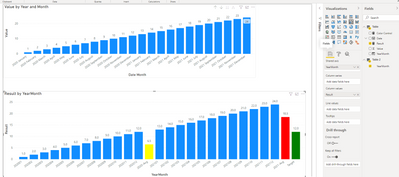
Then you may use 'YearMonth' from 'Table 2' as 'Shared axis' and apply conditional format based on 'Color Control'.
Result:
Best Regards
Allan
If this post helps, then please consider Accept it as the solution to help the other members find it more quickly.
Hi, @mokhan
Based on your description, I created data to reproduce your scenario. The pbix file is attached in the end.
Table:
Table 2(a calculated table):
Table 2 =
UNION(
DISTINCT('Table'[YearMonth]),
ROW("YearMonth","2020-Avg"),
ROW("YearMonth","2021-Avg"),
ROW("YearMonth","Target")
)
You may two measures as below.
Result =
SWITCH(
MAX('Table 2'[YearMonth]),
"2020-Avg",
CALCULATE(
AVERAGE('Table'[Value]),
FILTER(
ALL('Table'),
YEAR([Date])=2020
)
),
"2021-Avg",
CALCULATE(
AVERAGE('Table'[Value]),
FILTER(
ALL('Table'),
YEAR([Date])=2021
)
),
"Target",12,
CALCULATE(
SUM('Table'[Value]),
FILTER(
ALL('Table'),
[YearMonth]=MAX('Table 2'[YearMonth])
)
)
)Color Control =
SWITCH(
MAX('Table 2'[YearMonth]),
"2020-Avg","yellow",
"2021-Avg","red",
"Target","green"
)
Then you may use 'YearMonth' from 'Table 2' as 'Shared axis' and apply conditional format based on 'Color Control'.
Result:
Best Regards
Allan
If this post helps, then please consider Accept it as the solution to help the other members find it more quickly.
I need this
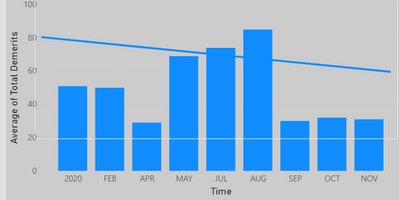
So far I got this
Need to add current year avg and target bar at the end.
@mokhan You will need to do a lot of manual work/calculations to achieve this. Would you settle for using the Line Column combo chart and putting the custom target value as a line value?
Or you could even use the Analytics features to set custom target as constant line and average for current year:
https://docs.microsoft.com/en-us/power-bi/transform-model/desktop-analytics-pane
Copying DAX from this post? Click here for a hack to quickly replace it with your own table names
Has this post solved your problem? Please Accept as Solution so that others can find it quickly and to let the community know your problem has been solved.
If you found this post helpful, please give Kudos C
I work as a Microsoft trainer and consultant, specialising in Power BI and Power Query.
www.excelwithallison.com
Check out the April 2026 Power BI update to learn about new features.
If you have recently started exploring Fabric, we'd love to hear how it's going. Your feedback can help with product improvements.
| User | Count |
|---|---|
| 37 | |
| 37 | |
| 31 | |
| 21 | |
| 16 |
| User | Count |
|---|---|
| 66 | |
| 56 | |
| 31 | |
| 26 | |
| 23 |