Join us in Barcelona for FabCon and SQLCon, September 28 - October 1, 2026.
This is best Fabric, Power BI, SQL and AI community event. How do we know? The last event sold out! Save €200 with code FABCMTY200.
Register now- Power BI forums
- Get Help with Power BI
- Desktop
- Service
- Report Server
- Power Query
- Mobile Apps
- Developer
- DAX Commands and Tips
- Custom Visuals Development Discussion
- Health and Life Sciences
- Power BI Spanish forums
- Translated Spanish Desktop
- Training and Consulting
- Instructor Led Training
- Dashboard in a Day for Women, by Women
- Galleries
- Data Stories Gallery
- Themes Gallery
- Contests Gallery
- QuickViz Gallery
- Quick Measures Gallery
- Visual Calculations Gallery
- Fabric Apps Gallery
- Notebook Gallery
- Translytical Task Flow Gallery
- TMDL Gallery
- R Script Showcase
- Webinars and Video Gallery
- Ideas
- Custom Visuals Ideas (read-only)
- Issues
- Issues
- Events
- Upcoming Events
July 28 - August 9 | Final Round of the Power BI Dataviz World Championships. This is your chance. Learn more
- Power BI forums
- Forums
- Get Help with Power BI
- Desktop
- Re: Replicating a Graph from Excel
- Subscribe to RSS Feed
- Mark Topic as New
- Mark Topic as Read
- Float this Topic for Current User
- Bookmark
- Subscribe
- Printer Friendly Page


- Mark as New
- Bookmark
- Subscribe
- Mute
- Subscribe to RSS Feed
- Permalink
- Report Inappropriate Content
Replicating a Graph from Excel
Hi
I need help reproducing a graph I have in Excel in Powe BI and have been trying to write a measure to use in graphs
It calculates how many desk were utilised (at least once in the day) or never utilised on a giving day. Where the data is recorded every hour (Slots)
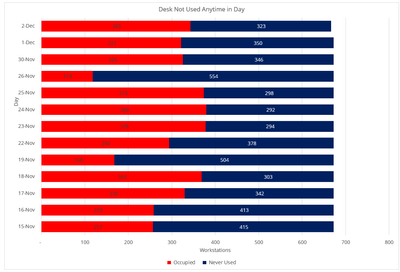
I have 3 Tables that are linked
BI_Location_Building_Data (A list of all location (Desks))
- Location
- Building
- Floor
- Department
BI_Slots
- Date Calculated from Time Start 14/03/2001
- TimeStart(Slots) Sample 14/03/2001 12:00
- 14/03/2001 13:00
- 14/03/2001 14:00
- 14/03/2001 15:00
- 14/03/2001 16:00
BI_SurveyData
- ID Autonumber
- Location
- Utilised 1 or 0
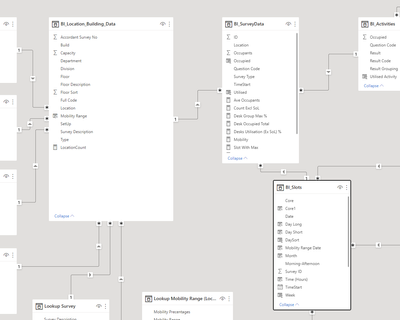
Can anyone help
Solved! Go to Solution.
- Mark as New
- Bookmark
- Subscribe
- Mute
- Subscribe to RSS Feed
- Permalink
- Report Inappropriate Content
Hi
Thanks cracked it hsed need to add a filter


- Mark as New
- Bookmark
- Subscribe
- Mute
- Subscribe to RSS Feed
- Permalink
- Report Inappropriate Content
Hi @flemingg62 ,
Do you have a specific question that we can answer? You should be able to achieve this using a 100% Stacked Bar Chart.
https://powerbidocs.com/2020/01/25/power-bi-100-stacked-bar-chart/
- Mark as New
- Bookmark
- Subscribe
- Mute
- Subscribe to RSS Feed
- Permalink
- Report Inappropriate Content
Hi
Thanks, but I need a measure to count the numner of locations never used on each day

- Mark as New
- Bookmark
- Subscribe
- Mute
- Subscribe to RSS Feed
- Permalink
- Report Inappropriate Content
Something along the lines of:
Never used =
VAR _Used =
    DISTINCTCOUNT ( Table[Locations] )
VAR _ALL =
    CALCULATE ( DISTINCTCOUNT ( Table[Locations), ALL(Table[Locations] ) )
RETURN
    _ALL - _Used
Did I answer your question? Mark my post as a solution!
In doing so, you are also helping me. Thank you!
Proud to be a Super User!
Paul on Linkedin.
- Mark as New
- Bookmark
- Subscribe
- Mute
- Subscribe to RSS Feed
- Permalink
- Report Inappropriate Content
Hi - Thanks
Been paying around with it for a few hours and no luck, but almost there, the send part is returning the correct values, but the first part needs to be limited to desks never used in a day
Never used =
VAR _Used =
DISTINCTCOUNT ( Table[Locations] ) I need to add a condition so that the values is limited to Location never used on a day, such as FILTER(SUM(BI_SurveyData(Utilised] =0)) I have tried may variation but no luck
VAR _ALL =
CALCULATE ( DISTINCTCOUNT ( Table[Locations), ALL(Table[Locations] ) )
RETURN
_ALL - _Used
I also have a measure, but no luck using this as well
Utilised Count = Sum((BI_SurveyData[Utilised]))
- Mark as New
- Bookmark
- Subscribe
- Mute
- Subscribe to RSS Feed
- Permalink
- Report Inappropriate Content
Can you share some dummy data or a link to a dummy PBIX file?
Did I answer your question? Mark my post as a solution!
In doing so, you are also helping me. Thank you!
Proud to be a Super User!
Paul on Linkedin.
- Mark as New
- Bookmark
- Subscribe
- Mute
- Subscribe to RSS Feed
- Permalink
- Report Inappropriate Content
Hi
Thanks cracked it hsed need to add a filter

Helpful resources

FabCon & SQLCon – Barcelona 2026
Join us in Barcelona for FabCon and SQLCon, the Fabric, Power BI, SQL, and AI community event. Save €200 with code FABCMTY200.

Power BI Monthly Update - July 2026
Check out the July 2026 Power BI update to learn about new features.

Power BI DataViz World Championships - June 2026
A new Power BI DataViz World Championship is coming this June! Don't miss out on submitting your entry.

| User | Count |
|---|---|
| 25 | |
| 23 | |
| 20 | |
| 18 | |
| 14 |


| User | Count |
|---|---|
| 22 | |
| 20 | |
| 20 | |
| 20 | |
| 20 |


