Get certified for free when you join Fabric Data Days 2026 and dive into Fabric, Power BI, SQL, AI, and other essential data skills.
Join nowJuly 28 - August 9 | Final Round of the Power BI Dataviz World Championships. This is your chance. Learn more
Hi there,
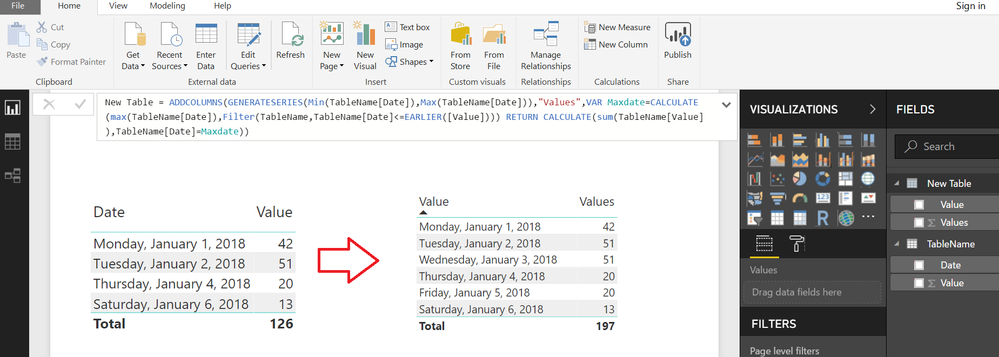
Does anyone know how to replicate the last value for a non-existing rows ?
For example:
I have values for the day 1/1/2018 / 1/2/2018 / 1/4/2018...
In this case I don't have value for 1/3/2018, how can I replicate the last value (1/2/2018) if I don't have this day in my table ?
*I'm using a date dimension in this visual.
Thank you,
Ricardo
Solved! Go to Solution.
Typically you do that in Power Query with something like "Fill".
@Hi @Greg_Deckler,
Thank for your answer,
However the dataset doesn't have this row. just my date table.
I should use this function "Fill" when the value is blank, right ?
Thank you,
Ricardo
One approach might be to create a Calculated Table with Missing Dates and Values
From the Modelling Tab>>>NEW TABLE
New Table =
ADDCOLUMNS (
GENERATESERIES ( MIN ( TableName[Date] ), MAX ( TableName[Date] ) ),
"Values",
VAR Maxdate =
CALCULATE (
MAX ( TableName[Date] ),
FILTER ( TableName, TableName[Date] <= EARLIER ( [Value] ) )
)
RETURN
CALCULATE ( SUM ( TableName[Value] ), TableName[Date] = Maxdate )
)
If you love stickers, then you will definitely want to check out our community sticker challenge, Barcelona edition!
Check out the July 2026 Power BI update to learn about new features.
| User | Count |
|---|---|
| 30 | |
| 28 | |
| 23 | |
| 21 | |
| 19 |
| User | Count |
|---|---|
| 41 | |
| 31 | |
| 18 | |
| 18 | |
| 15 |