Learn from the best! Meet the four finalists headed to the FINALS of the Power BI Dataviz World Championships! Register now
Hi there,
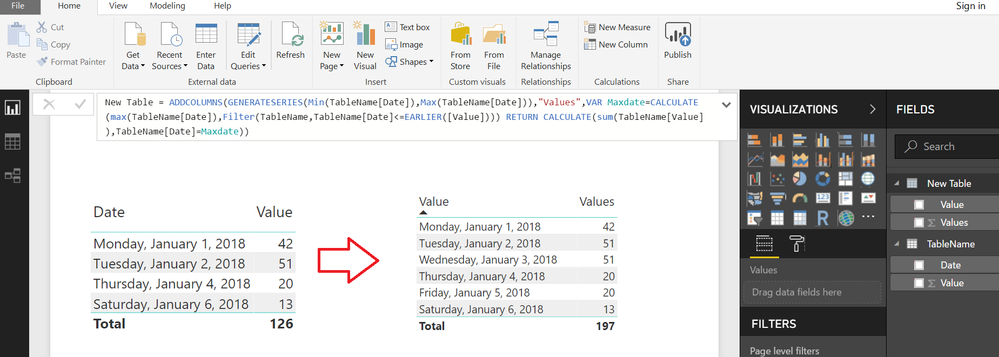
Does anyone know how to replicate the last value for a non-existing rows ?
For example:
I have values for the day 1/1/2018 / 1/2/2018 / 1/4/2018...
In this case I don't have value for 1/3/2018, how can I replicate the last value (1/2/2018) if I don't have this day in my table ?
*I'm using a date dimension in this visual.
Thank you,
Ricardo
Solved! Go to Solution.
Typically you do that in Power Query with something like "Fill".
@Hi @Greg_Deckler,
Thank for your answer,
However the dataset doesn't have this row. just my date table.
I should use this function "Fill" when the value is blank, right ?
Thank you,
Ricardo
One approach might be to create a Calculated Table with Missing Dates and Values
From the Modelling Tab>>>NEW TABLE
New Table =
ADDCOLUMNS (
GENERATESERIES ( MIN ( TableName[Date] ), MAX ( TableName[Date] ) ),
"Values",
VAR Maxdate =
CALCULATE (
MAX ( TableName[Date] ),
FILTER ( TableName, TableName[Date] <= EARLIER ( [Value] ) )
)
RETURN
CALCULATE ( SUM ( TableName[Value] ), TableName[Date] = Maxdate )
)
| User | Count |
|---|---|
| 57 | |
| 44 | |
| 32 | |
| 16 | |
| 14 |
| User | Count |
|---|---|
| 84 | |
| 70 | |
| 38 | |
| 27 | |
| 24 |