This is best Fabric, Power BI, SQL and AI community event. How do we know? The last event sold out! Save €200 with code FABCMTY200.
Register nowThe Fabric community is upgrading! Read all of the details including the timeline and what you can expect. Learn more
Hi there,
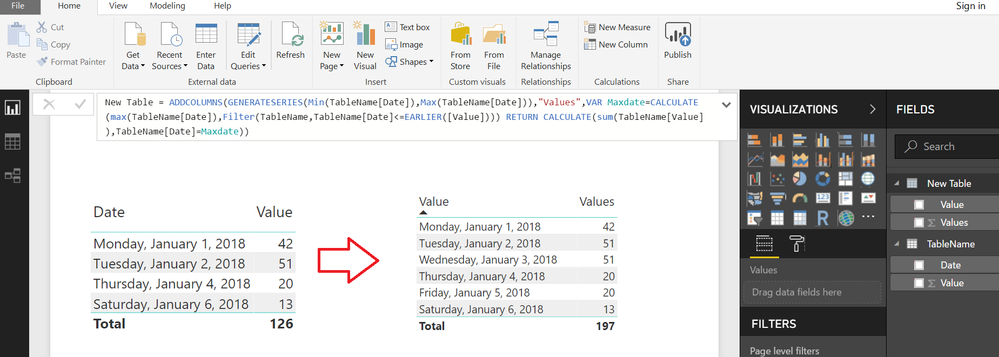
Does anyone know how to replicate the last value for a non-existing rows ?
For example:
I have values for the day 1/1/2018 / 1/2/2018 / 1/4/2018...
In this case I don't have value for 1/3/2018, how can I replicate the last value (1/2/2018) if I don't have this day in my table ?
*I'm using a date dimension in this visual.
Thank you,
Ricardo
Solved! Go to Solution.
Typically you do that in Power Query with something like "Fill".
@Hi @Greg_Deckler,
Thank for your answer,
However the dataset doesn't have this row. just my date table.
I should use this function "Fill" when the value is blank, right ?
Thank you,
Ricardo
One approach might be to create a Calculated Table with Missing Dates and Values
From the Modelling Tab>>>NEW TABLE
New Table =
ADDCOLUMNS (
GENERATESERIES ( MIN ( TableName[Date] ), MAX ( TableName[Date] ) ),
"Values",
VAR Maxdate =
CALCULATE (
MAX ( TableName[Date] ),
FILTER ( TableName, TableName[Date] <= EARLIER ( [Value] ) )
)
RETURN
CALCULATE ( SUM ( TableName[Value] ), TableName[Date] = Maxdate )
)
Join us in Barcelona for FabCon and SQLCon, the Fabric, Power BI, SQL, and AI community event. Save €200 with code FABCMTY200.
| User | Count |
|---|---|
| 24 | |
| 22 | |
| 20 | |
| 18 | |
| 14 |
| User | Count |
|---|---|
| 45 | |
| 38 | |
| 24 | |
| 22 | |
| 20 |