Don't miss your chance to take the Fabric Data Engineer (DP-600) exam for FREE! Find out how by attending the DP-600 session on April 23rd (pacific time), live or on-demand.
Learn moreNext up in the FabCon + SQLCon recap series: The roadmap for Microsoft SQL and Maximizing Developer experiences in Fabric. All sessions are available on-demand after the live show. Register now
Hi is there a way to add a custom column in query editor and replicate this dax code
Solved! Go to Solution.
Hi @Pandadev ,
Your closing brackets are wrong.
IF ([Event Code]="Q3" AND [MarketSector]="Commercial") THEN "AW"
ELSE IF ([Researcher]<>"SLR" AND [OperatorTypeCode]="16") THEN "SLR"
There is a nice example on the following blog:
https://www.fourmoo.com/2018/11/27/multiple-conditions-for-a-conditional-column-in-power-query/
Thanks,
Pragati
Hi @Pandadev ,
You can add a custom column on Query Editor in Power BI using IF-ELSE multiple conditional statements. Read more about it here: https://docs.microsoft.com/en-us/powerquery-m/m-spec-conditionals
Thanks,
Pragati
Thanks I looked at that solution , but I need it to check two different criteria , which was not available in the conditional column
in this example below it is looking at Event Code =Q3 and MarketSector = Commercial , then change to AW
AND([Event Code]="Q3", [MarketSector]="Commercial"), "AW",
Hi @Pandadev ,
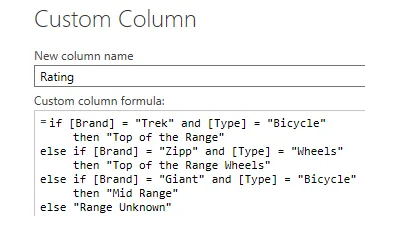
It will be a simple IF AND ELSE condition. Something like below: (you can find many examples online)
IF([Event Code]="Q3" AND [MarketSector]="Commercial") THEN "AW" ELSE IF ......
Thanks,
Pragati
I tried this but it shows an error on first AND , token comma expected
IF(
[Event Code]="Q3" AND [MarketSector]="Commercial") THEN "AW"
ELSE IF
[Researcher]<>"SLR" AND [OperatorTypeCode]="16") THEN "SLR" ))
Hi @Pandadev ,
Your closing brackets are wrong.
IF ([Event Code]="Q3" AND [MarketSector]="Commercial") THEN "AW"
ELSE IF ([Researcher]<>"SLR" AND [OperatorTypeCode]="16") THEN "SLR"
There is a nice example on the following blog:
https://www.fourmoo.com/2018/11/27/multiple-conditions-for-a-conditional-column-in-power-query/
Thanks,
Pragati
Thanks for the example , I have now managed to get it to work
If you have recently started exploring Fabric, we'd love to hear how it's going. Your feedback can help with product improvements.
A new Power BI DataViz World Championship is coming this June! Don't miss out on submitting your entry.
| User | Count |
|---|---|
| 46 | |
| 43 | |
| 39 | |
| 19 | |
| 15 |
| User | Count |
|---|---|
| 68 | |
| 67 | |
| 31 | |
| 27 | |
| 24 |