This is best Fabric, Power BI, SQL and AI community event. How do we know? The last event sold out! Save €200 with code FABCMTY200.
Register nowJuly 28 - August 9 | Final Round of the Power BI Dataviz World Championships. This is your chance. Learn more
Hi is there a way to add a custom column in query editor and replicate this dax code
Solved! Go to Solution.
Hi @Pandadev ,
Your closing brackets are wrong.
IF ([Event Code]="Q3" AND [MarketSector]="Commercial") THEN "AW"
ELSE IF ([Researcher]<>"SLR" AND [OperatorTypeCode]="16") THEN "SLR"
There is a nice example on the following blog:
https://www.fourmoo.com/2018/11/27/multiple-conditions-for-a-conditional-column-in-power-query/
Thanks,
Pragati
Hi @Pandadev ,
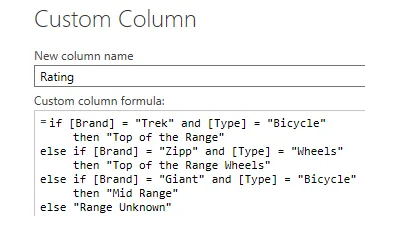
You can add a custom column on Query Editor in Power BI using IF-ELSE multiple conditional statements. Read more about it here: https://docs.microsoft.com/en-us/powerquery-m/m-spec-conditionals
Thanks,
Pragati
Thanks I looked at that solution , but I need it to check two different criteria , which was not available in the conditional column
in this example below it is looking at Event Code =Q3 and MarketSector = Commercial , then change to AW
AND([Event Code]="Q3", [MarketSector]="Commercial"), "AW",
Hi @Pandadev ,
It will be a simple IF AND ELSE condition. Something like below: (you can find many examples online)
IF([Event Code]="Q3" AND [MarketSector]="Commercial") THEN "AW" ELSE IF ......
Thanks,
Pragati
I tried this but it shows an error on first AND , token comma expected
IF(
[Event Code]="Q3" AND [MarketSector]="Commercial") THEN "AW"
ELSE IF
[Researcher]<>"SLR" AND [OperatorTypeCode]="16") THEN "SLR" ))
Hi @Pandadev ,
Your closing brackets are wrong.
IF ([Event Code]="Q3" AND [MarketSector]="Commercial") THEN "AW"
ELSE IF ([Researcher]<>"SLR" AND [OperatorTypeCode]="16") THEN "SLR"
There is a nice example on the following blog:
https://www.fourmoo.com/2018/11/27/multiple-conditions-for-a-conditional-column-in-power-query/
Thanks,
Pragati
Thanks for the example , I have now managed to get it to work
Join us in Barcelona for FabCon and SQLCon, the Fabric, Power BI, SQL, and AI community event. Save €200 with code FABCMTY200.
If you love stickers, then you will definitely want to check out our community sticker challenge, Barcelona edition!
Check out the July 2026 Power BI update to learn about new features.
| User | Count |
|---|---|
| 25 | |
| 23 | |
| 19 | |
| 17 | |
| 14 |
| User | Count |
|---|---|
| 24 | |
| 23 | |
| 20 | |
| 20 | |
| 19 |