Join us at FabCon Atlanta from March 16 - 20, 2026, for the ultimate Fabric, Power BI, AI and SQL community-led event. Save $200 with code FABCOMM.
Register now!The Power BI Data Visualization World Championships is back! It's time to submit your entry. Live now!
Hi is there a way to add a custom column in query editor and replicate this dax code
Solved! Go to Solution.
Hi @Pandadev ,
Your closing brackets are wrong.
IF ([Event Code]="Q3" AND [MarketSector]="Commercial") THEN "AW"
ELSE IF ([Researcher]<>"SLR" AND [OperatorTypeCode]="16") THEN "SLR"
There is a nice example on the following blog:
https://www.fourmoo.com/2018/11/27/multiple-conditions-for-a-conditional-column-in-power-query/
Thanks,
Pragati
Hi @Pandadev ,
You can add a custom column on Query Editor in Power BI using IF-ELSE multiple conditional statements. Read more about it here: https://docs.microsoft.com/en-us/powerquery-m/m-spec-conditionals
Thanks,
Pragati
Thanks I looked at that solution , but I need it to check two different criteria , which was not available in the conditional column
in this example below it is looking at Event Code =Q3 and MarketSector = Commercial , then change to AW
AND([Event Code]="Q3", [MarketSector]="Commercial"), "AW",
Hi @Pandadev ,
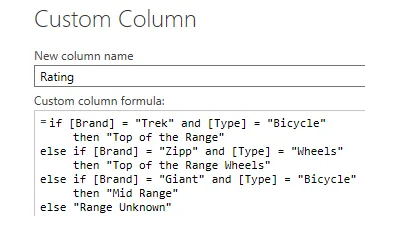
It will be a simple IF AND ELSE condition. Something like below: (you can find many examples online)
IF([Event Code]="Q3" AND [MarketSector]="Commercial") THEN "AW" ELSE IF ......
Thanks,
Pragati
I tried this but it shows an error on first AND , token comma expected
IF(
[Event Code]="Q3" AND [MarketSector]="Commercial") THEN "AW"
ELSE IF
[Researcher]<>"SLR" AND [OperatorTypeCode]="16") THEN "SLR" ))
Hi @Pandadev ,
Your closing brackets are wrong.
IF ([Event Code]="Q3" AND [MarketSector]="Commercial") THEN "AW"
ELSE IF ([Researcher]<>"SLR" AND [OperatorTypeCode]="16") THEN "SLR"
There is a nice example on the following blog:
https://www.fourmoo.com/2018/11/27/multiple-conditions-for-a-conditional-column-in-power-query/
Thanks,
Pragati
Thanks for the example , I have now managed to get it to work
The Power BI Data Visualization World Championships is back! It's time to submit your entry.
Check out the January 2026 Power BI update to learn about new features.
| User | Count |
|---|---|
| 56 | |
| 41 | |
| 39 | |
| 22 | |
| 21 |
| User | Count |
|---|---|
| 143 | |
| 106 | |
| 63 | |
| 38 | |
| 31 |