Join us at FabCon Atlanta from March 16 - 20, 2026, for the ultimate Fabric, Power BI, AI and SQL community-led event. Save $200 with code FABCOMM.
Register now!Get Fabric certified for FREE! Don't miss your chance! Learn more
Hey all,
I'm trying to replace values of a manager that has an incorrect manager assigned to a team member. The manager and team member have their own separate columns.
Where "Joe Smith" is the manager assigned to "Jane Doe", replace "Joe Smith" with "Robert Regular"
Let me know if that makes sense.
Solved! Go to Solution.
Hi.
Add a new column in power query.
if [Manager Column] = "Joe Smith" and [Team Member] = "Jane Doe" then "Robert Regular" else [Team Member]
Thanks
Hi.
Add a new column in power query.
if [Manager Column] = "Joe Smith" and [Team Member] = "Jane Doe" then "Robert Regular" else [Team Member]
Thanks
This is the answer! However, you need to reverse the logic here.
if [Team Member] = "Jane Doe" and [Manager] = "Joe Smith" then "Robert Regular" else [Manager]
Hi, @dukeof3arl
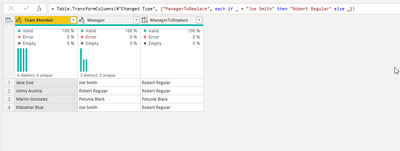
In Power query either transform column as this:
= Table.TransformColumns(#"Changed Type", {"ManagerToReplace", each if _ = "Joe Smith" then "Robert Regular" else _})
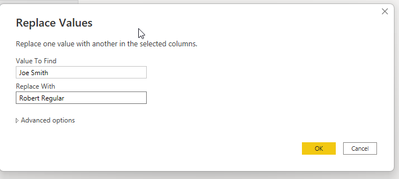
Or simply click
Ahh - I should've mentioned that I can't use that route because Joe Smith has many other team members assigned to him that need to remain the same. So Jane Doe is the issue. Where Jane Doe has Joe Smith as the manager, I ONLY want to replace her values of "Manager" with Robert Regular.
EDIT: And thanks for the speedy reply!
Share feedback directly with Fabric product managers, participate in targeted research studies and influence the Fabric roadmap.
Check out the January 2026 Power BI update to learn about new features.
| User | Count |
|---|---|
| 68 | |
| 59 | |
| 44 | |
| 20 | |
| 15 |
| User | Count |
|---|---|
| 104 | |
| 102 | |
| 37 | |
| 26 | |
| 26 |