This is best Fabric, Power BI, SQL and AI community event. How do we know? The last event sold out! Save €200 with code FABCMTY200.
Register nowA new Data Days event is coming soon! This time we’re going bigger than ever. Fabric, Power BI, SQL, AI and more. Don't miss out.
Hey all,
I'm trying to replace values of a manager that has an incorrect manager assigned to a team member. The manager and team member have their own separate columns.
Where "Joe Smith" is the manager assigned to "Jane Doe", replace "Joe Smith" with "Robert Regular"
Let me know if that makes sense.
Solved! Go to Solution.
Hi.
Add a new column in power query.
if [Manager Column] = "Joe Smith" and [Team Member] = "Jane Doe" then "Robert Regular" else [Team Member]
Thanks
Hi.
Add a new column in power query.
if [Manager Column] = "Joe Smith" and [Team Member] = "Jane Doe" then "Robert Regular" else [Team Member]
Thanks
This is the answer! However, you need to reverse the logic here.
if [Team Member] = "Jane Doe" and [Manager] = "Joe Smith" then "Robert Regular" else [Manager]
Hi, @dukeof3arl
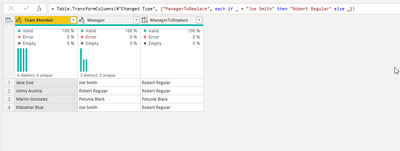
In Power query either transform column as this:
= Table.TransformColumns(#"Changed Type", {"ManagerToReplace", each if _ = "Joe Smith" then "Robert Regular" else _})
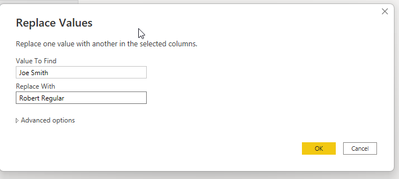
Or simply click
Ahh - I should've mentioned that I can't use that route because Joe Smith has many other team members assigned to him that need to remain the same. So Jane Doe is the issue. Where Jane Doe has Joe Smith as the manager, I ONLY want to replace her values of "Manager" with Robert Regular.
EDIT: And thanks for the speedy reply!
Check out the May 2026 Power BI update to learn about new features.
Sign up to receive a private message when registration opens and key events begin.
If you have recently started exploring Fabric, we'd love to hear how it's going. Your feedback can help with product improvements.
| User | Count |
|---|---|
| 31 | |
| 26 | |
| 23 | |
| 22 | |
| 13 |
| User | Count |
|---|---|
| 61 | |
| 47 | |
| 27 | |
| 23 | |
| 18 |