Don't miss your chance to take the Fabric Data Engineer (DP-600) exam for FREE! Find out how by watching the DP-600 session on-demand now through April 28th.
Learn moreJoin the FabCon + SQLCon recap series. Up next: Power BI, Real-Time Intelligence, IQ and AI, and Data Factory take center stage. All sessions are available on-demand after the live show. Register now
Hello
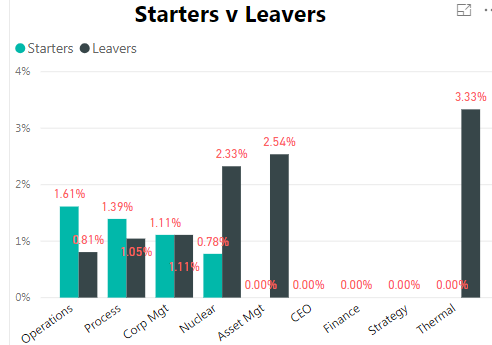
I am trying for 0.00% values not to be shown in the graph.
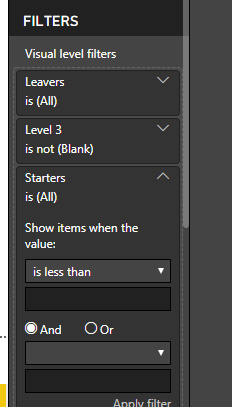
In the visalisation filters I have put Starters - show items greater than zero and same for Leavers.
However, that only works if each department has starters and leavers with a value greater than zero. So for Asset Mgt it wouldn't show anything even though leavers is 2.54%.
Is there any way round this?
Solved! Go to Solution.
if you remove +0 at the end the values will not be shown
I'd use DIVIDE to have division by 0 not showing with error
Starters Rate Level 3 =
CALCULATE(
DIVIDE(
COUNTROWS(Starters),
[Headcount Minus Weekly Level 3], -- I assume this is a measure
BLANK() -- value for DIV/0 error
)
)is there some specific reason why you added 0 at the end of the formula?
what's the syntax for your % measure?
normally if you use DIVIDE blanks should not be shown
otherwise you can create a separate masure that would be just used for the filter
Hi
Thanks for replying
I am using this measure -
if you remove +0 at the end the values will not be shown
I'd use DIVIDE to have division by 0 not showing with error
Starters Rate Level 3 =
CALCULATE(
DIVIDE(
COUNTROWS(Starters),
[Headcount Minus Weekly Level 3], -- I assume this is a measure
BLANK() -- value for DIV/0 error
)
)is there some specific reason why you added 0 at the end of the formula?
Ok that works. Thanks very much for your help
Just because I read on a forum that if you didn't want blank to show then add a zero at the end. At this point is was trying to find a a solution for that when using a Card.
Check out the April 2026 Power BI update to learn about new features.
If you have recently started exploring Fabric, we'd love to hear how it's going. Your feedback can help with product improvements.
A new Power BI DataViz World Championship is coming this June! Don't miss out on submitting your entry.
| User | Count |
|---|---|
| 43 | |
| 38 | |
| 35 | |
| 21 | |
| 15 |
| User | Count |
|---|---|
| 63 | |
| 58 | |
| 28 | |
| 27 | |
| 25 |