Learn from the best! Meet the four finalists headed to the FINALS of the Power BI Dataviz World Championships! Register now
Hello
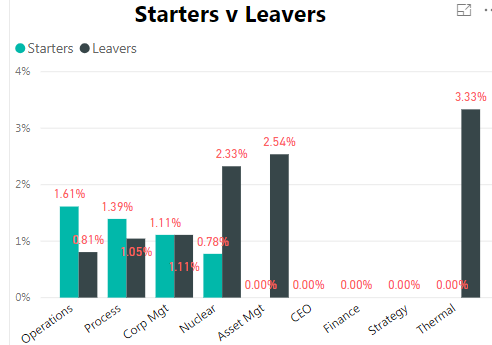
I am trying for 0.00% values not to be shown in the graph.
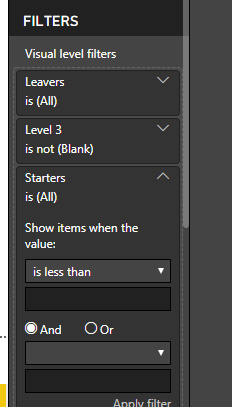
In the visalisation filters I have put Starters - show items greater than zero and same for Leavers.
However, that only works if each department has starters and leavers with a value greater than zero. So for Asset Mgt it wouldn't show anything even though leavers is 2.54%.
Is there any way round this?
Solved! Go to Solution.
if you remove +0 at the end the values will not be shown
I'd use DIVIDE to have division by 0 not showing with error
Starters Rate Level 3 =
CALCULATE(
DIVIDE(
COUNTROWS(Starters),
[Headcount Minus Weekly Level 3], -- I assume this is a measure
BLANK() -- value for DIV/0 error
)
)is there some specific reason why you added 0 at the end of the formula?
what's the syntax for your % measure?
normally if you use DIVIDE blanks should not be shown
otherwise you can create a separate masure that would be just used for the filter
Hi
Thanks for replying
I am using this measure -
if you remove +0 at the end the values will not be shown
I'd use DIVIDE to have division by 0 not showing with error
Starters Rate Level 3 =
CALCULATE(
DIVIDE(
COUNTROWS(Starters),
[Headcount Minus Weekly Level 3], -- I assume this is a measure
BLANK() -- value for DIV/0 error
)
)is there some specific reason why you added 0 at the end of the formula?
Ok that works. Thanks very much for your help
Just because I read on a forum that if you didn't want blank to show then add a zero at the end. At this point is was trying to find a a solution for that when using a Card.
| User | Count |
|---|---|
| 51 | |
| 35 | |
| 23 | |
| 17 | |
| 17 |
| User | Count |
|---|---|
| 68 | |
| 56 | |
| 40 | |
| 23 | |
| 22 |