cancel
Showing results for 
Search instead for 
Did you mean: 

The Power BI Data Visualization World Championships is back! It's time to submit your entry. Live now!

Reply
rosscortb
Post Patron
Post Patron

Remove zero values from graphs

Hello


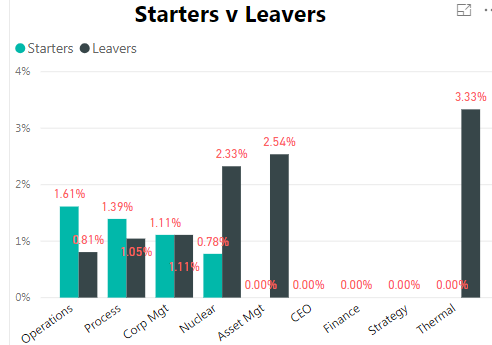
I am trying for 0.00% values not to be shown in the graph.

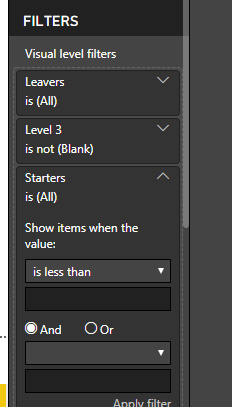
In the visalisation filters I have put Starters - show items greater than zero and same for Leavers.

However, that only works if each department has starters and leavers with a value greater than zero. So for Asset Mgt it wouldn't show anything even though leavers is 2.54%.


Is there any way round this?

ss45.PNGssam.PNG

1 ACCEPTED SOLUTION
Stachu
Community Champion
Community Champion

if you remove +0 at the end the values will not be shown
I'd use DIVIDE to have division by 0 not showing with error

Starters Rate Level 3 = 
CALCULATE(
    DIVIDE(
        COUNTROWS(Starters),
        [Headcount Minus Weekly Level 3], -- I assume this is a measure
        BLANK() -- value for DIV/0 error
    )
)

is there some specific reason why you added 0 at the end of the formula?


Did I answer your question? Mark my post as a solution!
Thank you for the kudos 🙂

View solution in original post

5 REPLIES 5
Stachu
Community Champion
Community Champion

what's the syntax for your % measure?
normally if you use DIVIDE blanks should not be shown

otherwise you can create a separate masure that would be just used for the filter 


Did I answer your question? Mark my post as a solution!
Thank you for the kudos 🙂

Hi 


Thanks for replying


I am using this measure - 

Starters Rate Level 3 = CALCULATE(Countrows(Starters)/'DB Headcount'[Headcount Minus Weekly Level 3])+0
 
Ross
Stachu
Community Champion
Community Champion

if you remove +0 at the end the values will not be shown
I'd use DIVIDE to have division by 0 not showing with error

Starters Rate Level 3 = 
CALCULATE(
    DIVIDE(
        COUNTROWS(Starters),
        [Headcount Minus Weekly Level 3], -- I assume this is a measure
        BLANK() -- value for DIV/0 error
    )
)

is there some specific reason why you added 0 at the end of the formula?


Did I answer your question? Mark my post as a solution!
Thank you for the kudos 🙂

Ok that works. Thanks very much for your help

Just because I read on a forum that if you didn't want blank to show then add a zero at the end. At this point is was trying to find a a solution for that when using a Card.

Helpful resources

Announcements
FabCon Atlanta 2026 carousel

FabCon Atlanta 2026

Join us at FabCon Atlanta, March 16-20, for the ultimate Fabric, Power BI, AI and SQL community-led event. Save $200 with code FABCOMM.