We've captured the moments from FabCon & SQLCon that everyone is talking about, and we are bringing them to the community, live and on-demand. Starts on April 14th. Register now
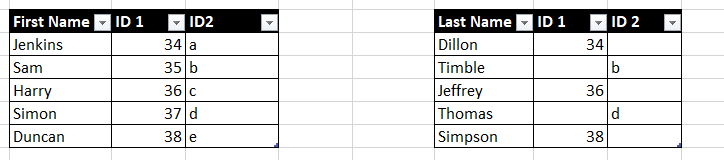
Hi all. I need to create a relationship connecting table 1 and table 2.
If I create a link using only ID 1, some data will be lost. Likewise for ID 2.
Is there a way of using both ID 1 and ID in table 2 to link to Table 1?
Thank you
Solved! Go to Solution.
Hi @Anonymous
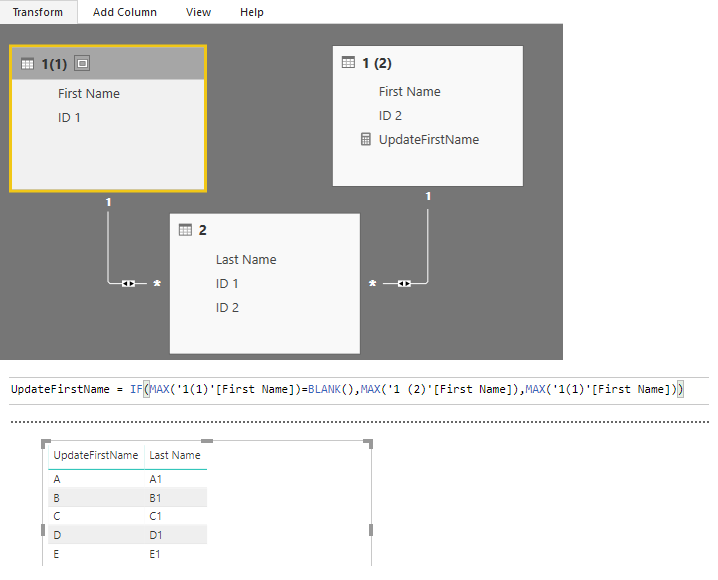
After splitting the first table. You may set the relationships as below. Then you may create a measure to get all the FirstName.
UpdateFirstName =
IF (
MAX ( '1(1)'[First Name] ) = BLANK (),
MAX ( '1 (2)'[First Name] ),
MAX ( '1(1)'[First Name] )
)
Regards,
Cherie
Proud to be a PBI Community Champion
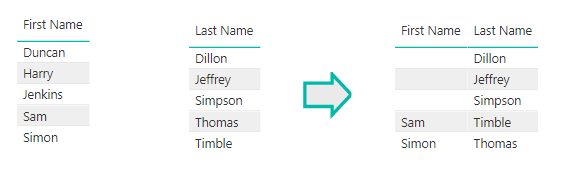
Unfortunately your solution provides this. The first Name and Last name should show all data from both columns
Hi @Anonymous
After splitting the first table. You may set the relationships as below. Then you may create a measure to get all the FirstName.
UpdateFirstName =
IF (
MAX ( '1(1)'[First Name] ) = BLANK (),
MAX ( '1 (2)'[First Name] ),
MAX ( '1(1)'[First Name] )
)
Regards,
Cherie
Using your method, will I have to create a new measure for every subsequent column e.g.
UpdateFirstName, UpdateEyeColour,UpdateShoeSize etc?
Many thanks
If you have recently started exploring Fabric, we'd love to hear how it's going. Your feedback can help with product improvements.
A new Power BI DataViz World Championship is coming this June! Don't miss out on submitting your entry.
Share feedback directly with Fabric product managers, participate in targeted research studies and influence the Fabric roadmap.
| User | Count |
|---|---|
| 53 | |
| 38 | |
| 33 | |
| 17 | |
| 17 |
| User | Count |
|---|---|
| 67 | |
| 63 | |
| 38 | |
| 34 | |
| 22 |