Get certified for free when you join Fabric Data Days 2026 and dive into Fabric, Power BI, SQL, AI, and other essential data skills.
Join nowTry your skills in the Power BI Dataviz World Championship! Round one ends June 26. Join now
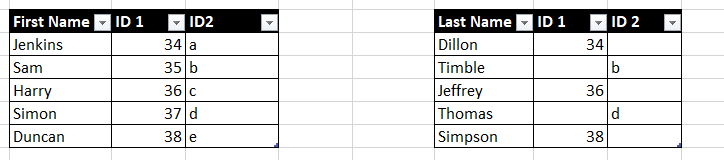
Hi all. I need to create a relationship connecting table 1 and table 2.
If I create a link using only ID 1, some data will be lost. Likewise for ID 2.
Is there a way of using both ID 1 and ID in table 2 to link to Table 1?
Thank you
Solved! Go to Solution.
Hi @Anonymous
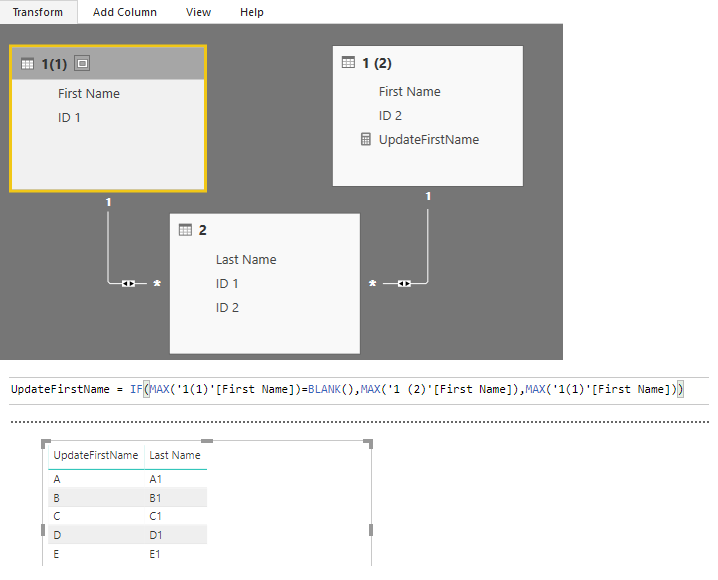
After splitting the first table. You may set the relationships as below. Then you may create a measure to get all the FirstName.
UpdateFirstName =
IF (
MAX ( '1(1)'[First Name] ) = BLANK (),
MAX ( '1 (2)'[First Name] ),
MAX ( '1(1)'[First Name] )
)
Regards,
Cherie
Proud to be a PBI Community Champion
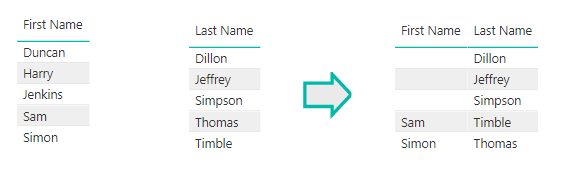
Unfortunately your solution provides this. The first Name and Last name should show all data from both columns
Hi @Anonymous
After splitting the first table. You may set the relationships as below. Then you may create a measure to get all the FirstName.
UpdateFirstName =
IF (
MAX ( '1(1)'[First Name] ) = BLANK (),
MAX ( '1 (2)'[First Name] ),
MAX ( '1(1)'[First Name] )
)
Regards,
Cherie
Using your method, will I have to create a new measure for every subsequent column e.g.
UpdateFirstName, UpdateEyeColour,UpdateShoeSize etc?
Many thanks
Don't miss out on Data Days, June 15 through August 7. Learn Fabric, Power BI, SQL, AI and more.
Check out the May 2026 Power BI update to learn about new features.
| User | Count |
|---|---|
| 24 | |
| 22 | |
| 21 | |
| 20 | |
| 14 |
| User | Count |
|---|---|
| 59 | |
| 53 | |
| 41 | |
| 31 | |
| 27 |