Join us at FabCon Atlanta from March 16 - 20, 2026, for the ultimate Fabric, Power BI, AI and SQL community-led event. Save $200 with code FABCOMM.
Register now!The Power BI Data Visualization World Championships is back! Get ahead of the game and start preparing now! Learn more
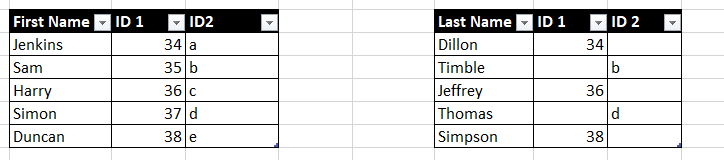
Hi all. I need to create a relationship connecting table 1 and table 2.
If I create a link using only ID 1, some data will be lost. Likewise for ID 2.
Is there a way of using both ID 1 and ID in table 2 to link to Table 1?
Thank you
Solved! Go to Solution.
Hi @Anonymous
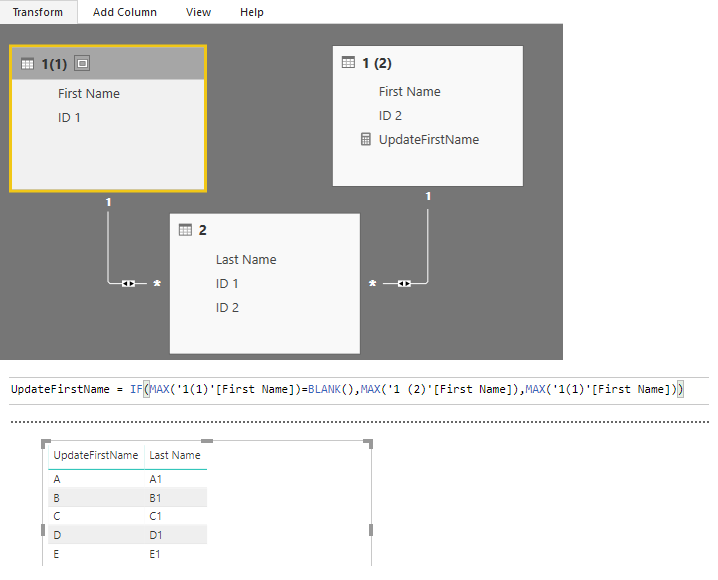
After splitting the first table. You may set the relationships as below. Then you may create a measure to get all the FirstName.
UpdateFirstName =
IF (
MAX ( '1(1)'[First Name] ) = BLANK (),
MAX ( '1 (2)'[First Name] ),
MAX ( '1(1)'[First Name] )
)
Regards,
Cherie
Proud to be a PBI Community Champion
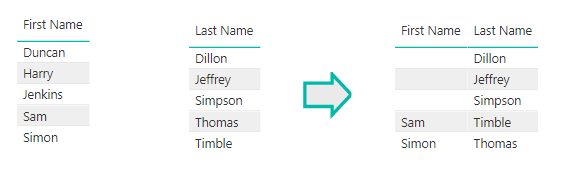
Unfortunately your solution provides this. The first Name and Last name should show all data from both columns
Hi @Anonymous
After splitting the first table. You may set the relationships as below. Then you may create a measure to get all the FirstName.
UpdateFirstName =
IF (
MAX ( '1(1)'[First Name] ) = BLANK (),
MAX ( '1 (2)'[First Name] ),
MAX ( '1(1)'[First Name] )
)
Regards,
Cherie
Using your method, will I have to create a new measure for every subsequent column e.g.
UpdateFirstName, UpdateEyeColour,UpdateShoeSize etc?
Many thanks
The Power BI Data Visualization World Championships is back! Get ahead of the game and start preparing now!
| User | Count |
|---|---|
| 39 | |
| 37 | |
| 33 | |
| 33 | |
| 29 |
| User | Count |
|---|---|
| 132 | |
| 90 | |
| 78 | |
| 66 | |
| 65 |