

Learn from the best! Meet the four finalists headed to the FINALS of the Power BI Dataviz World Championships! Register now
Hi everyone,
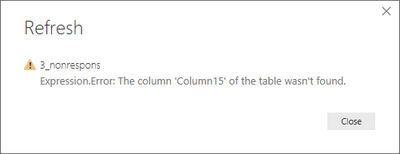
When I refresh a table in Power BI, I got this message:
"Expression.error: the columns "column15" of the table was not found"
Indeed, initially I had 15 columns in my datasheet where column 15 was empty, but with the second update of my datasheet, the empty column was deleted (because not needed).
But when I want to refresh the table in Power BI, I get the error that there is a column 15 missing.
How can I solve this in Power BI?
Thanks for your answer!
Solved! Go to Solution.
Hi @S_D,
You need to delete all the reference to "Column15" in Power Query code.
In Query Editor mode, delete the highlighted part in M code under "Changed Type" step.
Best regards,
Yuliana Gu
Hi @S_D,
You need to delete all the reference to "Column15" in Power Query code.
In Query Editor mode, delete the highlighted part in M code under "Changed Type" step.
Best regards,
Yuliana Gu
Hi @S_D
You have to update your load in "Edit Query", you probably have a transformation on the column that was deleted. (classic one: Promoted header)
Feel free to share the file if you need further help
A new Power BI DataViz World Championship is coming this June! Don't miss out on submitting your entry.
Share feedback directly with Fabric product managers, participate in targeted research studies and influence the Fabric roadmap.
| User | Count |
|---|---|
| 50 | |
| 34 | |
| 32 | |
| 18 | |
| 17 |
| User | Count |
|---|---|
| 64 | |
| 64 | |
| 41 | |
| 27 | |
| 24 |