

Learn from the best! Meet the four finalists headed to the FINALS of the Power BI Dataviz World Championships! Register now
Hi everyone,
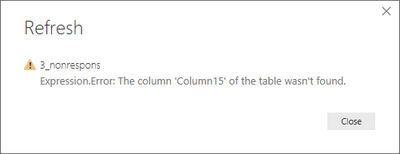
When I refresh a table in Power BI, I got this message:
"Expression.error: the columns "column15" of the table was not found"
Indeed, initially I had 15 columns in my datasheet where column 15 was empty, but with the second update of my datasheet, the empty column was deleted (because not needed).
But when I want to refresh the table in Power BI, I get the error that there is a column 15 missing.
How can I solve this in Power BI?
Thanks for your answer!
Solved! Go to Solution.
Hi @S_D,
You need to delete all the reference to "Column15" in Power Query code.
In Query Editor mode, delete the highlighted part in M code under "Changed Type" step.
Best regards,
Yuliana Gu
Hi @S_D,
You need to delete all the reference to "Column15" in Power Query code.
In Query Editor mode, delete the highlighted part in M code under "Changed Type" step.
Best regards,
Yuliana Gu
Hi @S_D
You have to update your load in "Edit Query", you probably have a transformation on the column that was deleted. (classic one: Promoted header)
Feel free to share the file if you need further help
| User | Count |
|---|---|
| 51 | |
| 39 | |
| 29 | |
| 19 | |
| 17 |
| User | Count |
|---|---|
| 66 | |
| 56 | |
| 40 | |
| 21 | |
| 19 |