Join us in Barcelona for FabCon and SQLCon, September 28 - October 1, 2026.
This is best Fabric, Power BI, SQL and AI community event. How do we know? The last event sold out! Save €200 with code FABCMTY200.
Register now- Power BI forums
- Get Help with Power BI
- Desktop
- Service
- Report Server
- Power Query
- Mobile Apps
- Developer
- DAX Commands and Tips
- Custom Visuals Development Discussion
- Health and Life Sciences
- Power BI Spanish forums
- Translated Spanish Desktop
- Training and Consulting
- Instructor Led Training
- Dashboard in a Day for Women, by Women
- Galleries
- Data Stories Gallery
- Themes Gallery
- Contests Gallery
- QuickViz Gallery
- Quick Measures Gallery
- Visual Calculations Gallery
- Fabric Apps Gallery
- Notebook Gallery
- Translytical Task Flow Gallery
- TMDL Gallery
- R Script Showcase
- Webinars and Video Gallery
- Ideas
- Custom Visuals Ideas (read-only)
- Issues
- Issues
- Events
- Upcoming Events
The Fabric community is now in read-only for platform upgrade. Learn more
- Power BI forums
- Forums
- Get Help with Power BI
- Desktop
- Re: Reference Line Question
- Subscribe to RSS Feed
- Mark Topic as New
- Mark Topic as Read
- Float this Topic for Current User
- Bookmark
- Subscribe
- Printer Friendly Page

- Mark as New
- Bookmark
- Subscribe
- Mute
- Subscribe to RSS Feed
- Permalink
Reference Line Question
Hi All
I am an advanced Qlik user and looking to find a way to add a reference line to a trend chart in Power BI.
I have a calculated measure ie KPI_5_BaseLineMean which returns one value depending on date selections. I would like to add this measure as a reference line to the line chart. Please see the example screenshots below.
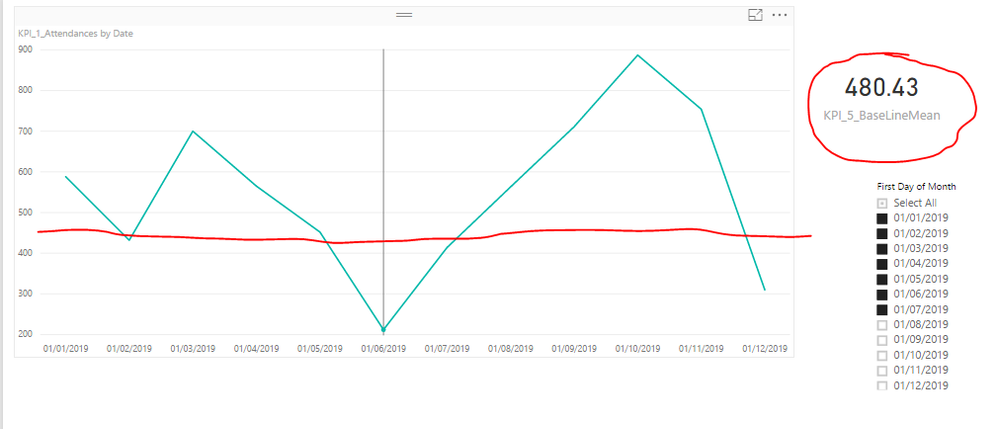
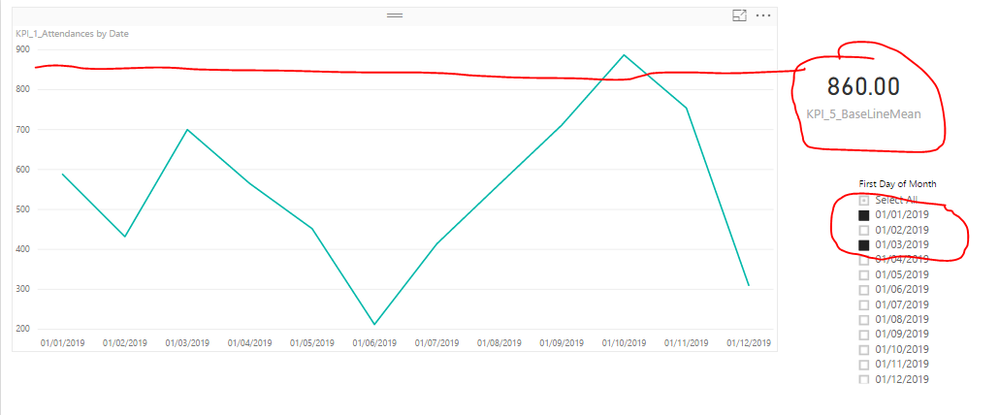
Regards
Kay
Solved! Go to Solution.


- Mark as New
- Bookmark
- Subscribe
- Mute
- Subscribe to RSS Feed
- Permalink
Hi @kay87,
I have made a mockup of a file using only dates + value and calculating the moving average:
- Create a date table
- Make a non-active relationship between both table based on date
- Create the following measure:
BASE_LINE =
CALCULATE (
    AVERAGEX (
        SUMMARIZE (
            ALL ( 'Fact Table'[Date]; 'Fact Table'[Values] );
            'Fact Table'[Date];
            "AVERAGE VALUES"; AVERAGE ( 'Fact Table'[Values] )
        );
        [AVERAGE VALUES]
    );
    'Fact Table'[Date] = VALUES ( 'Fact Table'[Date] );
    USERELATIONSHIP ( DimDate[Date]; 'Fact Table'[Date] )
)
Be aware that I'm using AVERAGEX but based on your context you may have to use another type of aggregator.- Create a slicer with the Date table date
- Add the measure to your line chart along side with the values.
As you can see the average is moving with the changes of the slicer.
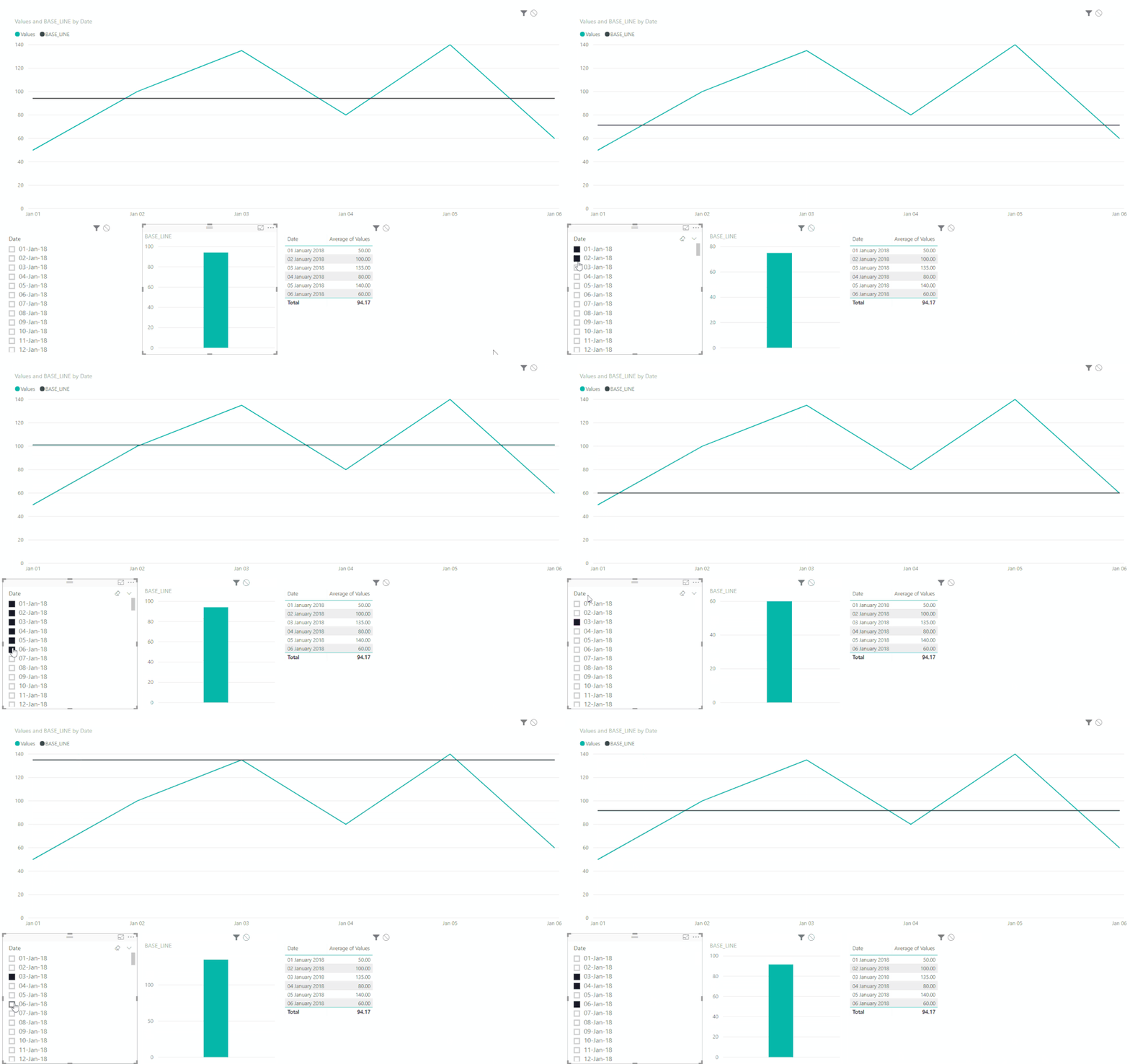
Not sure if this is waht you need.
Regards,
Mfelix
Regards
Miguel Félix
Did I answer your question? Mark my post as a solution!
Proud to be a Super User!
Check out my blog: Power BI em Português
- Mark as New
- Bookmark
- Subscribe
- Mute
- Subscribe to RSS Feed
- Permalink
Thank you soo very much for this MFelix. This is very close to what I want to do. My average formula is very different but this is massively helpful and point sme in a direction.
Is there a chance you could share the bix file for my reference?
Regards
Kay
- Mark as New
- Bookmark
- Subscribe
- Mute
- Subscribe to RSS Feed
- Permalink
Hi @kay87,
I have made a mockup of a file using only dates + value and calculating the moving average:
- Create a date table
- Make a non-active relationship between both table based on date
- Create the following measure:
BASE_LINE =
CALCULATE (
    AVERAGEX (
        SUMMARIZE (
            ALL ( 'Fact Table'[Date]; 'Fact Table'[Values] );
            'Fact Table'[Date];
            "AVERAGE VALUES"; AVERAGE ( 'Fact Table'[Values] )
        );
        [AVERAGE VALUES]
    );
    'Fact Table'[Date] = VALUES ( 'Fact Table'[Date] );
    USERELATIONSHIP ( DimDate[Date]; 'Fact Table'[Date] )
)
Be aware that I'm using AVERAGEX but based on your context you may have to use another type of aggregator.- Create a slicer with the Date table date
- Add the measure to your line chart along side with the values.
As you can see the average is moving with the changes of the slicer.
Not sure if this is waht you need.
Regards,
Mfelix
Regards
Miguel Félix
Did I answer your question? Mark my post as a solution!
Proud to be a Super User!
Check out my blog: Power BI em Português- Mark as New
- Bookmark
- Subscribe
- Mute
- Subscribe to RSS Feed
- Permalink
Thank you soo very much for this MFelix. This is very close to what I want to do. My average formula is very different but this is massively helpful and point sme in a direction.
Is there a chance you could share the bix file for my reference?
Regards
Kay
- Mark as New
- Bookmark
- Subscribe
- Mute
- Subscribe to RSS Feed
- Permalink
Hi @kay87,
See attach the PBIX file.
Be aware it's a we transfer link so will only last 7 days.
Regards,
MFelix
Regards
Miguel Félix
Did I answer your question? Mark my post as a solution!
Proud to be a Super User!
Check out my blog: Power BI em Português

- Mark as New
- Bookmark
- Subscribe
- Mute
- Subscribe to RSS Feed
- Permalink
Didn't get the screen shots. You could potentially do this via something like a clustered column and line chart visual.
OK, now I see the screen shots. Weird. Well, currently you cannot use columns or measures in Analytics pane constant lines to the best of my knowledge.
Follow on LinkedIn
@ me in replies or I'll lose your thread!!!
Instead of a Kudo, please vote for this idea
Become an expert!: Enterprise DNA
External Tools: MSHGQM
YouTube Channel!: Microsoft Hates Greg
Latest book!: DAX For Humans
DAX is easy, CALCULATE makes DAX hard...

Helpful resources

FabCon & SQLCon – Barcelona 2026
Join us in Barcelona for FabCon and SQLCon, the Fabric, Power BI, SQL, and AI community event. Save €200 with code FABCMTY200.

Power BI DataViz World Championships - June 2026
A new Power BI DataViz World Championship is coming this June! Don't miss out on submitting your entry.

| User | Count |
|---|---|
| 23 | |
| 22 | |
| 14 | |
| 14 | |
| 13 |


| User | Count |
|---|---|
| 47 | |
| 39 | |
| 24 | |
| 20 | |
| 20 |


