cancel
Showing results for 
Search instead for 
Did you mean: 

Learn from the best! Meet the four finalists headed to the FINALS of the Power BI Dataviz World Championships! Register now

Reply
huguest
Advocate II
Advocate II

Query Editor equivalent to Excel MACTH function


Hello,

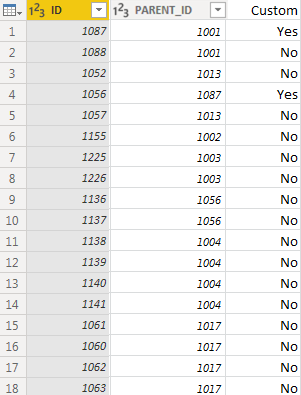
Trying to do somthing that I am sure is simple but cannot figure it out...  I havea  table with an ID and a Parent ID column.  I need to add a custom column that will tell me if, for each ID (row), there is another row where the Parent ID matches that ID.


In Excel, I would use something like "=MATCH(B2,A:A,0)", but cannot figure out how to do in in the Power Bi Query Editor.


I know how to do it with a Merge / Expand, but think there should be something simpler...


Thanks!

Capture.PNG

2 REPLIES 2
edhans
Community Champion
Community Champion

I don't know if I would say it is easier, but it can be done without a merge. I'm returning a 1 or 0, but you could wrap that in an if/then/else to return Yes/No or whatever.
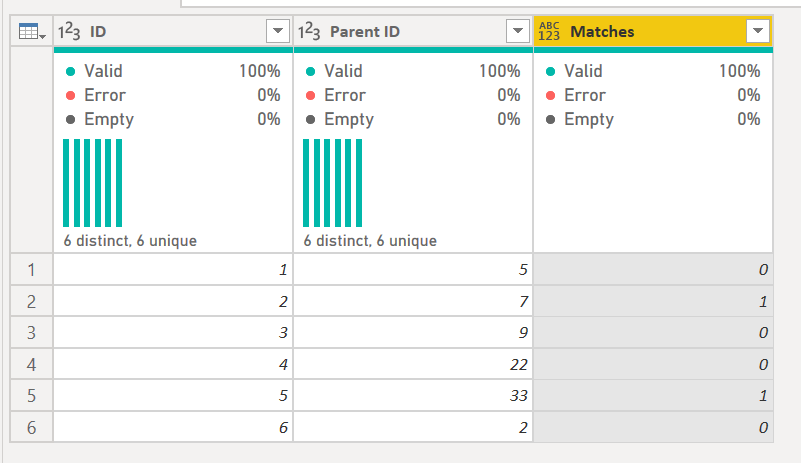
 

2020-04-30 08_45_46-Untitled - Power Query Editor.png


The code to do it is below.

The key is this statement:

    #"Added Matches" = Table.AddColumn(#"Changed Type", "Matches", each let varID = [ID]
                        in 
                          Table.RowCount(
                            Table.SelectRows(#"Changed Type", each [Parent ID] = varID)
                          )
                        )
  1. It assigns the current row ID to varID
  2. It then does a filtering of the table (previous #"Changed Type" table) where the [Parent ID] = varID
  3. It counts the rows. It will return 0 if there are none, or the row count, 1+ if there are 1 or more matches.


1) In Power Query, select New Source, then Blank Query
2) On the Home ribbon, select "Advanced Editor" button
3) Remove everything you see, then paste the M code I've given you in that box.
4) Press Done

let
    Source = Table.FromRows(Json.Document(Binary.Decompress(Binary.FromText("HcixDQAgCATAXb6mEQTjLIT91/D97nLdWDAkxhpOHSmoK23KXUwyQqy/mHk=", BinaryEncoding.Base64), Compression.Deflate)), let _t = ((type text) meta [Serialized.Text = true]) in type table [ID = _t, #"Parent ID" = _t]),
    #"Changed Type" = Table.TransformColumnTypes(Source,{{"ID", Int64.Type}, {"Parent ID", Int64.Type}}),
    #"Added Matches" = Table.AddColumn(#"Changed Type", "Matches", each let varID = [ID]
                        in 
                          Table.RowCount(
                            Table.SelectRows(#"Changed Type", each [Parent ID] = varID)
                          )
                        )
in
    #"Added Matches"


Did I answer your question? Mark my post as a solution!
Did my answers help arrive at a solution? Give it a kudos by clicking the Thumbs Up!

DAX is for Analysis. Power Query is for Data Modeling


Proud to be a Super User!

MCSA: BI Reporting
Greg_Deckler
Community Champion
Community Champion

Maybe @ImkeF or @edhans can help with a Power Query function to do it. In DAX you would likely use LOOKUPVALUE or something like MAXX(FILTER(...)...)


Follow on LinkedIn
@ me in replies or I'll lose your thread!!!
Instead of a Kudo, please vote for this idea
Become an expert!: Enterprise DNA
External Tools: MSHGQM
YouTube Channel!: Microsoft Hates Greg
Latest book!:
DAX For Humans

DAX is easy, CALCULATE makes DAX hard...

Helpful resources

Announcements
New to Fabric survey Carousel

New to Fabric Survey

If you have recently started exploring Fabric, we'd love to hear how it's going. Your feedback can help with product improvements.

Power BI DataViz World Championships carousel

Power BI DataViz World Championships - June 2026

A new Power BI DataViz World Championship is coming this June! Don't miss out on submitting your entry.

Join our Fabric User Panel

Join our Fabric User Panel

Share feedback directly with Fabric product managers, participate in targeted research studies and influence the Fabric roadmap.

March Power BI Update Carousel

Power BI Community Update - March 2026

Check out the March 2026 Power BI update to learn about new features.