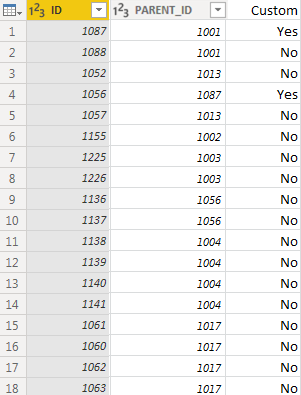
I don't know if I would say it is easier, but it can be done without a merge. I'm returning a 1 or 0, but you could wrap that in an if/then/else to return Yes/No or whatever.
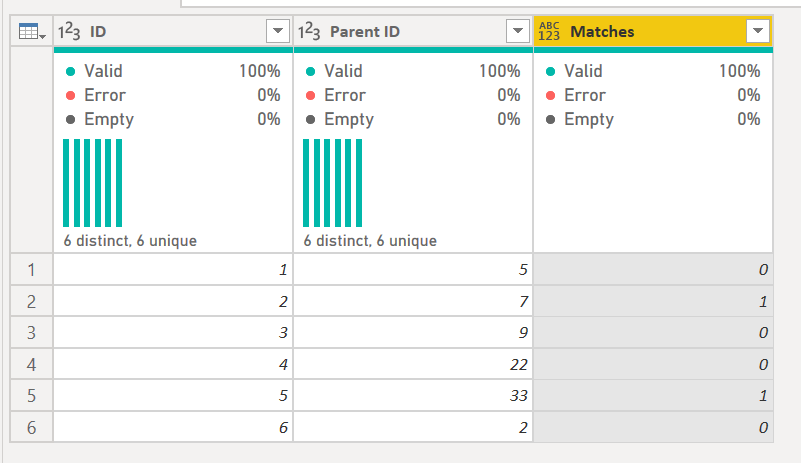
The code to do it is below.
The key is this statement:
    #"Added Matches" = Table.AddColumn(#"Changed Type", "Matches", each let varID = [ID]
                        in
                          Table.RowCount(
                            Table.SelectRows(#"Changed Type", each [Parent ID] = varID)
                          )
                        )
- It assigns the current row ID to varID
- It then does a filtering of the table (previous #"Changed Type" table) where the [Parent ID] = varID
- It counts the rows. It will return 0 if there are none, or the row count, 1+ if there are 1 or more matches.
1) In Power Query, select New Source, then Blank Query
2) On the Home ribbon, select "Advanced Editor" button
3) Remove everything you see, then paste the M code I've given you in that box.
4) Press Done
let
    Source = Table.FromRows(Json.Document(Binary.Decompress(Binary.FromText("HcixDQAgCATAXb6mEQTjLIT91/D97nLdWDAkxhpOHSmoK23KXUwyQqy/mHk=", BinaryEncoding.Base64), Compression.Deflate)), let _t = ((type text) meta [Serialized.Text = true]) in type table [ID = _t, #"Parent ID" = _t]),
    #"Changed Type" = Table.TransformColumnTypes(Source,{{"ID", Int64.Type}, {"Parent ID", Int64.Type}}),
    #"Added Matches" = Table.AddColumn(#"Changed Type", "Matches", each let varID = [ID]
                        in
                          Table.RowCount(
                            Table.SelectRows(#"Changed Type", each [Parent ID] = varID)
                          )
                        )
in
    #"Added Matches"
Did I answer your question? Mark my post as a solution!Did my answers help arrive at a solution? Give it a kudos by clicking the Thumbs Up!DAX is for Analysis. Power Query is for Data Modeling
Proud to be a Super User!
MCSA: BI Reporting