Get certified for free when you join Fabric Data Days 2026 and dive into Fabric, Power BI, SQL, AI, and other essential data skills.
Join nowData Days is here! Join us now for 60+ days of learning, challenges, and connection. Learn more
Hi, I am trying to convert the below python script to DAX Calculated column:
import numpy as np
dataset["OBV"] = np.where(dataset['close'] > dataset['close'].shift(1), dataset['volume'] ,
np.where(dataset['close'] < dataset['close'].shift(1), -dataset['volume'], 0)).cumsum()
Reason:
I am not able to add python to my on-premise gateway to enable scheduled refreshes.
Sample Data:
| AsofDate | close | Volume |
| 2/1/1990 | 328 | 50000 |
| 2/2/1990 | 330 | 45000 |
| 2/3/1990 | 342 | 65000 |
| 2/4/1990 | 352 | 45000 |
| 2/5/1990 | 320 | 20000 |
| 2/6/1990 | 365 | 35000 |
| 2/7/1990 | 652 | 45600 |
I appreceate any help with DAX! Thanks
Solved! Go to Solution.
hi @Anonymous
for your requirement, you need to create two column to get your requirement:
judgecolumn = var _yesterdaydate=CALCULATE(MAX('Table'[As of Date]),FILTER('Table','Table'[As of Date]<EARLIER('Table'[As of Date])))
var _yesterdayclose=CALCULATE(SUM('Table'[Close]),FILTER('Table','Table'[As of Date] = _yesterdaydate))
return
DIVIDE('Table'[Close]-_yesterdayclose,ABS('Table'[Close]-_yesterdayclose)) *'Table'[Volume]OBV =
SUMX(FILTER('Table','Table'[As of Date]<=EARLIER('Table'[As of Date])),[judgecolumn])
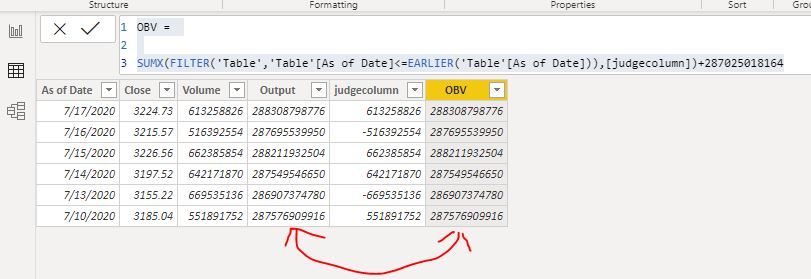
Result:
For first date of your sample data, there is no yesterday OBV, so I have give a fixed value
OBV =
SUMX(FILTER('Table','Table'[As of Date]<=EARLIER('Table'[As of Date])),[judgecolumn])+287025018164
here is sample pbix file, please try it.
Regards,
Lin
Hello @amitchandak
Thanks for your response.
Sample Data: Sample Data
Input Columns: As of Date, Close, Volume
Output Column: OBV
Business Logic:
If today's close is greater than yesterday's close then:
OBV = Yesterday’s OBV + Today’s Volume
If today’s close is less than yesterday’s close then:
OBV = Yesterday’s OBV – Today’s Volume
If today’s close is equal to yesterday’s close then:
OBV = Yesterday’s OBV
Execution using Python:
import numpy as np
dataset["OBV"] = np.where(dataset['close'] > dataset['close'].shift(1), dataset['volume'] ,
np.where(dataset['close'] < dataset['close'].shift(1), -dataset['volume'], 0)).cumsum()
I am trying to execute the same using DAX.
Let me know if you have questions!
Thanks,
SV
hi @Anonymous
for your requirement, you need to create two column to get your requirement:
judgecolumn = var _yesterdaydate=CALCULATE(MAX('Table'[As of Date]),FILTER('Table','Table'[As of Date]<EARLIER('Table'[As of Date])))
var _yesterdayclose=CALCULATE(SUM('Table'[Close]),FILTER('Table','Table'[As of Date] = _yesterdaydate))
return
DIVIDE('Table'[Close]-_yesterdayclose,ABS('Table'[Close]-_yesterdayclose)) *'Table'[Volume]OBV =
SUMX(FILTER('Table','Table'[As of Date]<=EARLIER('Table'[As of Date])),[judgecolumn])
Result:
For first date of your sample data, there is no yesterday OBV, so I have give a fixed value
OBV =
SUMX(FILTER('Table','Table'[As of Date]<=EARLIER('Table'[As of Date])),[judgecolumn])+287025018164
here is sample pbix file, please try it.
Regards,
Lin
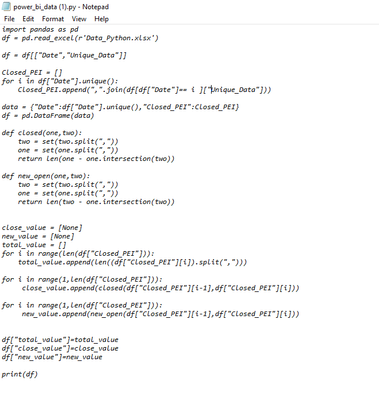
Hi i need to convert this python script into dax any idea?
Don't miss out on Data Days, June 15 through August 7. Learn Fabric, Power BI, SQL, AI and more.
Check out the May 2026 Power BI update to learn about new features.
| User | Count |
|---|---|
| 23 | |
| 23 | |
| 20 | |
| 18 | |
| 14 |
| User | Count |
|---|---|
| 58 | |
| 51 | |
| 41 | |
| 30 | |
| 24 |