cancel
Showing results for 
Search instead for 
Did you mean: 

The Power BI Data Visualization World Championships is back! It's time to submit your entry. Live now!

Reply
Anonymous
Not applicable

Python script to DAX

Hi, I am trying to convert the below python script to DAX Calculated column:


import numpy as np
dataset["OBV"] = np.where(dataset['close'] > dataset['close'].shift(1), dataset['volume']  ,
np.where(dataset['close'] < dataset['close'].shift(1), -dataset['volume'], 0)).cumsum()


Reason:

I am not able to add python to my on-premise gateway to enable scheduled refreshes. 


Sample Data:

AsofDatecloseVolume
2/1/199032850000
2/2/199033045000
2/3/199034265000
2/4/199035245000
2/5/199032020000
2/6/199036535000
2/7/199065245600


I appreceate any help with DAX! Thanks 

1 ACCEPTED SOLUTION

hi @Anonymous 

for your requirement, you need to create two column to get your requirement:

judgecolumn = var _yesterdaydate=CALCULATE(MAX('Table'[As of Date]),FILTER('Table','Table'[As of Date]<EARLIER('Table'[As of Date])))
var _yesterdayclose=CALCULATE(SUM('Table'[Close]),FILTER('Table','Table'[As of Date] = _yesterdaydate))
return

DIVIDE('Table'[Close]-_yesterdayclose,ABS('Table'[Close]-_yesterdayclose)) *'Table'[Volume]
OBV = 

SUMX(FILTER('Table','Table'[As of Date]<=EARLIER('Table'[As of Date])),[judgecolumn])


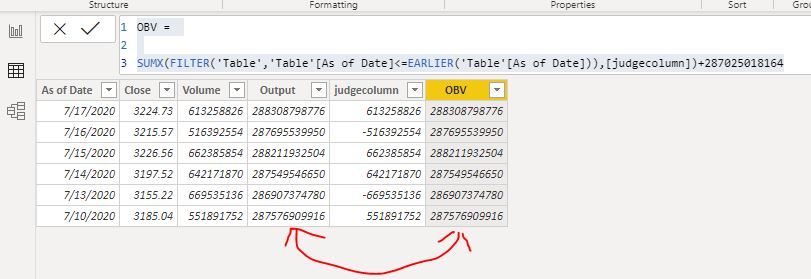
Result:

For first date of your sample data, there is no yesterday OBV, so I have give a fixed value

OBV = 

SUMX(FILTER('Table','Table'[As of Date]<=EARLIER('Table'[As of Date])),[judgecolumn])+287025018164

10.JPG


here is sample pbix file, please try it.


Regards,

Lin

Community Support Team _ Lin
If this post helps, then please consider Accept it as the solution to help the other members find it more quickly.

View solution in original post

4 REPLIES 4
amitchandak
Super User
Super User

@Anonymous , what is expected output and logic.

Share with Power BI Enthusiasts: Full Power BI Video (20 Hours) YouTube
Microsoft Fabric Series 60+ Videos YouTube
Microsoft Fabric Hindi End to End YouTube
Anonymous
Not applicable

 Hello @amitchandak 
Thanks for your response. 


Sample Data: Sample Data 

Input Columns: As of Date, Close, Volume

Output Column: OBV


Business Logic:

If today's close is greater than yesterday's close then:
         OBV = Yesterday’s OBV + Today’s Volume

If today’s close is less than yesterday’s close then:
         OBV = Yesterday’s OBV – Today’s Volume 

If today’s close is equal to yesterday’s close then:
         OBV = Yesterday’s OBV


Execution using Python:


import numpy as np
dataset["OBV"] = np.where(dataset['close'] > dataset['close'].shift(1), dataset['volume']  ,
np.where(dataset['close'] < dataset['close'].shift(1), -dataset['volume'], 0)).cumsum()


I am trying to execute the same using DAX. 


Let me know if you have questions!


Thanks,

SV


hi @Anonymous 

for your requirement, you need to create two column to get your requirement:

judgecolumn = var _yesterdaydate=CALCULATE(MAX('Table'[As of Date]),FILTER('Table','Table'[As of Date]<EARLIER('Table'[As of Date])))
var _yesterdayclose=CALCULATE(SUM('Table'[Close]),FILTER('Table','Table'[As of Date] = _yesterdaydate))
return

DIVIDE('Table'[Close]-_yesterdayclose,ABS('Table'[Close]-_yesterdayclose)) *'Table'[Volume]
OBV = 

SUMX(FILTER('Table','Table'[As of Date]<=EARLIER('Table'[As of Date])),[judgecolumn])


Result:

For first date of your sample data, there is no yesterday OBV, so I have give a fixed value

OBV = 

SUMX(FILTER('Table','Table'[As of Date]<=EARLIER('Table'[As of Date])),[judgecolumn])+287025018164

10.JPG


here is sample pbix file, please try it.


Regards,

Lin

Community Support Team _ Lin
If this post helps, then please consider Accept it as the solution to help the other members find it more quickly.

vinay2214_0-1641560376121.png

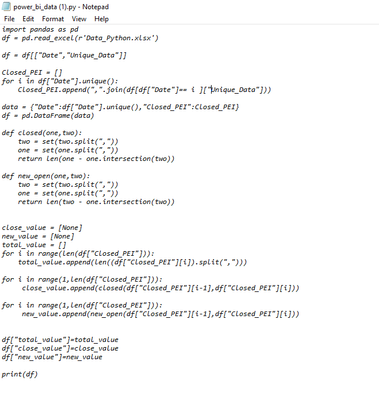
Hi i need to convert this python script into dax any idea?

Helpful resources

Announcements
December 2025 Power BI Update Carousel

Power BI Monthly Update - December 2025

Check out the December 2025 Power BI Holiday Recap!

FabCon Atlanta 2026 carousel

FabCon Atlanta 2026

Join us at FabCon Atlanta, March 16-20, for the ultimate Fabric, Power BI, AI and SQL community-led event. Save $200 with code FABCOMM.