cancel
Showing results for 
Search instead for 
Did you mean: 

Did you hear? There's a new SQL AI Developer certification (DP-800). Start preparing now and be one of the first to get certified. Register now

Reply
LeonardoVega
Frequent Visitor

Problems whit SSAS live conection

Good Morning.
I have several problems with power bi desktop.
1.- I can't connect to a server using a vpn. The customer gave me a vpn to connect to your database. The problem is that I can't connect to the SQL Server Analysis Services database.
It says the server name is incorrect. The only way I can connect to SSAS is by using the runas command in cmd to run the program with the domain and the server administrator.

manchester runas.png

I need to find a way to connect to the VPN without the need to use cmd commands.


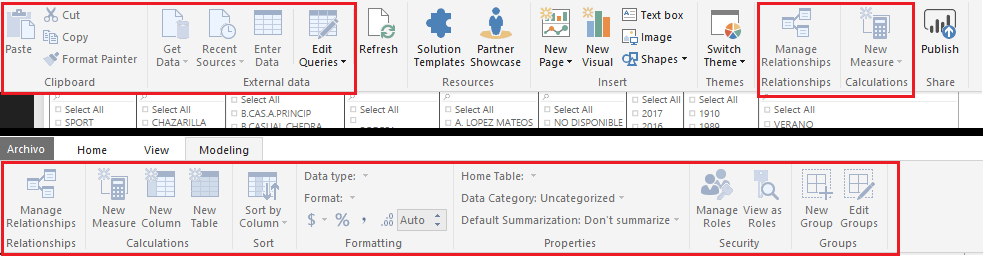
2.- Once connected to SSAS in live connection mode, I cannot customize the reports.
MANCHESTER ERRORES.png

I need create a measure and column in the report but most of the features of power bi are not enabled.
I have the need to specify roles in the roles manage to end users.
I need help solving these problems.

These two problems are from the same report.
Do you have any ideas?
Thank you so much.

1 ACCEPTED SOLUTION
v-sihou-msft
Microsoft Employee
Microsoft Employee

@LeonardoVega


1. Since you need VPN to connect your database remotely, you have to the runas command to run Power BI Desktop. It's not supported to connect directly within Power BI Desktop.


2. When you open live connection to SSAS server, it's not supported to edit the source model. Currently, only Tabular model supports creating measures in Power BI Desktop. For multidimensional cubes, you can't create any measures or calculated columns.


Connect to SSAS Multidimensional Models in Power BI Desktop

Analysis Services Tabular data in Power BI Desktop


Regards,


View solution in original post

2 REPLIES 2
v-sihou-msft
Microsoft Employee
Microsoft Employee

@LeonardoVega


1. Since you need VPN to connect your database remotely, you have to the runas command to run Power BI Desktop. It's not supported to connect directly within Power BI Desktop.


2. When you open live connection to SSAS server, it's not supported to edit the source model. Currently, only Tabular model supports creating measures in Power BI Desktop. For multidimensional cubes, you can't create any measures or calculated columns.


Connect to SSAS Multidimensional Models in Power BI Desktop

Analysis Services Tabular data in Power BI Desktop


Regards,


Helpful resources

Announcements
April Power BI Update Carousel

Power BI Monthly Update - April 2026

Check out the April 2026 Power BI update to learn about new features.

Fabric SQL PBI Data Days

Data Days 2026 coming soon!

Sign up to receive a private message when registration opens and key events begin.

New to Fabric survey Carousel

New to Fabric Survey

If you have recently started exploring Fabric, we'd love to hear how it's going. Your feedback can help with product improvements.

Power BI DataViz World Championships carousel

Power BI DataViz World Championships - June 2026

A new Power BI DataViz World Championship is coming this June! Don't miss out on submitting your entry.