Join us at FabCon Atlanta from March 16 - 20, 2026, for the ultimate Fabric, Power BI, AI and SQL community-led event. Save $200 with code FABCOMM.
Register now!The Power BI Data Visualization World Championships is back! Get ahead of the game and start preparing now! Learn more
Hello!
I am having trouble in calculating percentage of total for columns after upivoting. I have unpivoted selected columns (leaving unique id column) having 'YES' or 'NO' attribute (YES =1, NO=0).
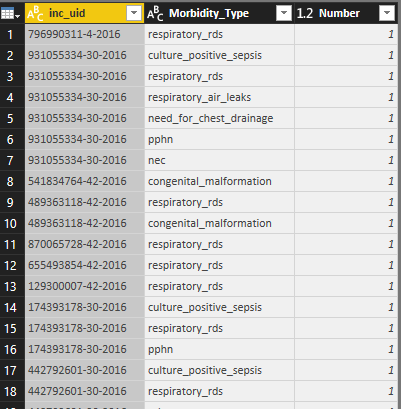
After unpivoiting of selected columns
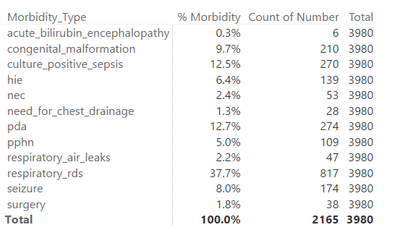
When I pulled the value to Matrix visualization, it's showing the percentage of the attribute (morbidity_type) total (2165). What I need is to calculate the percentage of 'morbidity_type' from total number of enteries (here it is 3980 as shown below)
"Total" is a measure.
What I want here is percentage from 'Total" enrolled babies and not just "morbidity_type" total. Could anyone of you know how to do this? Please help. Thanks in advance!
Regards,
Raj
Solved! Go to Solution.
Hi @rajudoc,
If I understand you correctly, you should be able to use the formula below to create a new measure to calculate the percentage from 'Total" enrolled babies. And show the new created measure on your Matrix visualization. ![]()
Percentage of Morbidity = DIVIDE ( COUNT ( 'Table1'[Number] ), [Total] )
Note: Just replace 'Table1' with your real table name.
Regards
If I understand you correctly,
You need divide "YES" by all count. You can use for this next meeasure
Test = DIVIDE ( COUNT ( 'Table1'[Number] ), calculate([Total],all('Table1' )))
If I understand you correctly,
You need divide "YES" by all count. You can use for this next meeasure
Test = DIVIDE ( COUNT ( 'Table1'[Number] ), calculate([Total],all('Table1' )))
Even this measure also works! Thanks a lot sir![]()
Hi @rajudoc,
If I understand you correctly, you should be able to use the formula below to create a new measure to calculate the percentage from 'Total" enrolled babies. And show the new created measure on your Matrix visualization. ![]()
Percentage of Morbidity = DIVIDE ( COUNT ( 'Table1'[Number] ), [Total] )
Note: Just replace 'Table1' with your real table name.
Regards
Worked like wonder
. Thanks a lot!
The Power BI Data Visualization World Championships is back! Get ahead of the game and start preparing now!
Check out the November 2025 Power BI update to learn about new features.
| User | Count |
|---|---|
| 59 | |
| 46 | |
| 42 | |
| 23 | |
| 18 |
| User | Count |
|---|---|
| 193 | |
| 124 | |
| 101 | |
| 67 | |
| 49 |