
cancel
Showing results for 
Search instead for 
Did you mean: 

July 7 - July 17 | Round 2 of the Power BI Dataviz World Championships. Don't miss your chance! Learn more

Reply
LeonardoVega
Frequent Visitor

Problems whit SSAS live conection

Good Morning.
I have several problems with power bi desktop.
1.- I can't connect to a server using a vpn. The customer gave me a vpn to connect to your database. The problem is that I can't connect to the SQL Server Analysis Services database.
It says the server name is incorrect. The only way I can connect to SSAS is by using the runas command in cmd to run the program with the domain and the server administrator.

manchester runas.png

I need to find a way to connect to the VPN without the need to use cmd commands.


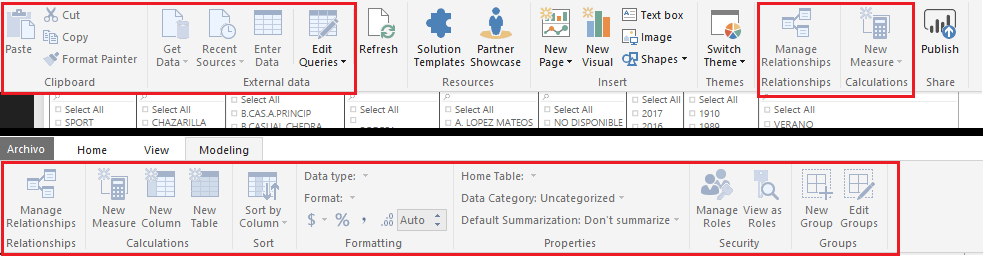
2.- Once connected to SSAS in live connection mode, I cannot customize the reports.

MANCHESTER ERRORES.png

I need create a measure and column in the report but most of the features of power bi are not enabled.
I have the need to specify roles in the roles manage to end users.
I need help solving these problems.

These two problems are from the same report.
Do you have any ideas?
Thank you so much.

1 ACCEPTED SOLUTION
v-sihou-msft
Microsoft Employee
Microsoft Employee

@LeonardoVega


1. Since you need VPN to connect your database remotely, you have to the runas command to run Power BI Desktop. It's not supported to connect directly within Power BI Desktop.


2. When you open live connection to SSAS server, it's not supported to edit the source model. Currently, only Tabular model supports creating measures in Power BI Desktop. For multidimensional cubes, you can't create any measures or calculated columns.


Connect to SSAS Multidimensional Models in Power BI Desktop

Analysis Services Tabular data in Power BI Desktop


Regards,


View solution in original post

2 REPLIES 2
v-sihou-msft
Microsoft Employee
Microsoft Employee

@LeonardoVega


1. Since you need VPN to connect your database remotely, you have to the runas command to run Power BI Desktop. It's not supported to connect directly within Power BI Desktop.


2. When you open live connection to SSAS server, it's not supported to edit the source model. Currently, only Tabular model supports creating measures in Power BI Desktop. For multidimensional cubes, you can't create any measures or calculated columns.


Connect to SSAS Multidimensional Models in Power BI Desktop

Analysis Services Tabular data in Power BI Desktop


Regards,


Helpful resources

Announcements
FabCon and SQLCon Barcelona 2026

FabCon & SQLCon – Barcelona 2026

Join us in Barcelona for FabCon and SQLCon, the Fabric, Power BI, SQL, and AI community event. Save €200 with code FABCMTY200.

60 days of Data Days Carousel

Data Days 2026

Join Data Days 2026: 60 days of free live/on-demand sessions, challenges, study groups, and certification opportunities.

Power BI DataViz World Championships carousel

Power BI DataViz World Championships - June 2026

A new Power BI DataViz World Championship is coming this June! Don't miss out on submitting your entry.

Top Solution Authors