This time we’re going bigger than ever. Fabric, Power BI, SQL, AI and more. We're covering it all. You won't want to miss it.
Learn moreLevel up your Power BI skills this month - build one visual each week and tell better stories with data! Get started
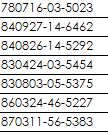
I have a text column data which is national ID. The first 2 characters are Year, following 2 characters are Month and the next 2 characters are Day.
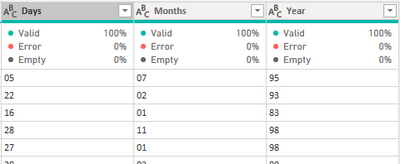
I have use Extract > Range in Add Column menu of Power Query to seperate out 3 columns for the first 6 digit. So I have Year, Month and Day column. Each of these column is having 2 characters in Text data type.
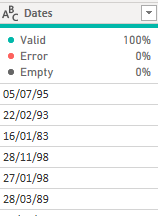
Next, I highlighted these 3 columns and right click to select Merge Columns, seperator is / . The output is like this
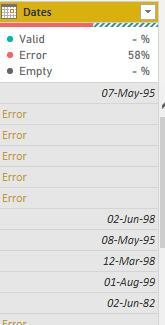
Then, I change the data type to Date data type. However, it comes out with Error.
How to solve this errror?
This works.
Hi,
I think your setting is mm/dd/yyyy, but you want dd/mm/yyyy. (Or, other way round)
Please try the below.
-Place the cursor on the column name [Dates]
-Right click
-select "Change Type" -> "Using Locale"
-select "Data Type" = "Date"
-select "Locale" = English (United Kingdom) or your setting.
Check out the April 2026 Power BI update to learn about new features.
Sign up to receive a private message when registration opens and key events begin.
If you have recently started exploring Fabric, we'd love to hear how it's going. Your feedback can help with product improvements.
| User | Count |
|---|---|
| 36 | |
| 33 | |
| 31 | |
| 24 | |
| 18 |
| User | Count |
|---|---|
| 66 | |
| 50 | |
| 33 | |
| 24 | |
| 24 |