Join us at FabCon Atlanta from March 16 - 20, 2026, for the ultimate Fabric, Power BI, AI and SQL community-led event. Save $200 with code FABCOMM.
Register now!The Power BI Data Visualization World Championships is back! Get ahead of the game and start preparing now! Learn more
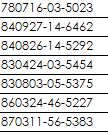
I have a text column data which is national ID. The first 2 characters are Year, following 2 characters are Month and the next 2 characters are Day.
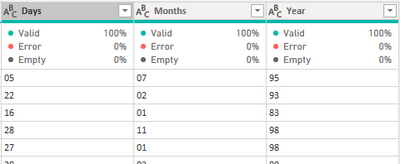
I have use Extract > Range in Add Column menu of Power Query to seperate out 3 columns for the first 6 digit. So I have Year, Month and Day column. Each of these column is having 2 characters in Text data type.
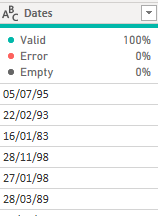
Next, I highlighted these 3 columns and right click to select Merge Columns, seperator is / . The output is like this
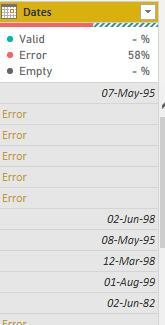
Then, I change the data type to Date data type. However, it comes out with Error.
How to solve this errror?
This works.
Hi,
I think your setting is mm/dd/yyyy, but you want dd/mm/yyyy. (Or, other way round)
Please try the below.
-Place the cursor on the column name [Dates]
-Right click
-select "Change Type" -> "Using Locale"
-select "Data Type" = "Date"
-select "Locale" = English (United Kingdom) or your setting.
The Power BI Data Visualization World Championships is back! Get ahead of the game and start preparing now!
| User | Count |
|---|---|
| 63 | |
| 55 | |
| 42 | |
| 41 | |
| 23 |
| User | Count |
|---|---|
| 167 | |
| 136 | |
| 120 | |
| 79 | |
| 54 |