Get certified for free when you join Fabric Data Days 2026 and dive into Fabric, Power BI, SQL, AI, and other essential data skills.
Join nowJuly 28 - August 9 | Final Round of the Power BI Dataviz World Championships. This is your chance. Learn more
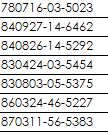
I have a text column data which is national ID. The first 2 characters are Year, following 2 characters are Month and the next 2 characters are Day.
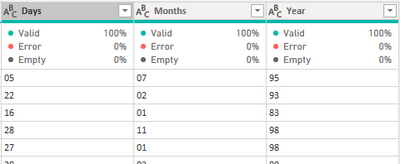
I have use Extract > Range in Add Column menu of Power Query to seperate out 3 columns for the first 6 digit. So I have Year, Month and Day column. Each of these column is having 2 characters in Text data type.
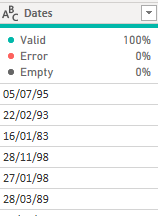
Next, I highlighted these 3 columns and right click to select Merge Columns, seperator is / . The output is like this
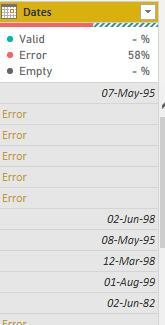
Then, I change the data type to Date data type. However, it comes out with Error.
How to solve this errror?
This works.
Hi,
I think your setting is mm/dd/yyyy, but you want dd/mm/yyyy. (Or, other way round)
Please try the below.
-Place the cursor on the column name [Dates]
-Right click
-select "Change Type" -> "Using Locale"
-select "Data Type" = "Date"
-select "Locale" = English (United Kingdom) or your setting.
Join us in Barcelona for FabCon and SQLCon, the Fabric, Power BI, SQL, and AI community event. Save €200 with code FABCMTY200.
If you love stickers, then you will definitely want to check out our community sticker challenge, Barcelona edition!
Check out the July 2026 Power BI update to learn about new features.
| User | Count |
|---|---|
| 30 | |
| 28 | |
| 23 | |
| 21 | |
| 19 |
| User | Count |
|---|---|
| 44 | |
| 31 | |
| 17 | |
| 17 | |
| 15 |