Get certified for free when you join Fabric Data Days 2026 and dive into Fabric, Power BI, SQL, AI, and other essential data skills.
Join nowJuly 7 - July 17 | Round 2 of the Power BI Dataviz World Championships. Don't miss your chance! Learn more
Hello,
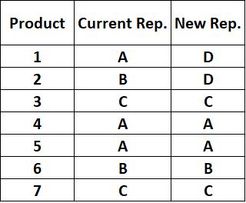
Guys I have the follwoing problems which I hope you will help me solving it.
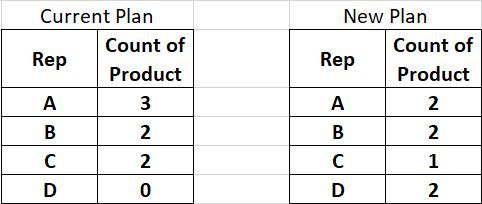
I want to create a page slicer/filter for Rep. to compare how many products each rep. is handling based on current and new plan.Thus, I want to create two tables on the same page with a slice..The first table will represent the current plane and the other table will represent the new plan....something like this:
As you can noticed Rep. "D" is not available in current plan...my question is how can I create one slice/filter with all rep names that will filter both tables correctly.for example in case I select Rep. "D",the current plan table will show nothing while the new plan table will show D = 2 products.
Thanks in advance.
Solved! Go to Solution.
@AZL solution attached, everything is done in edit query.
Subscribe to the @PowerBIHowTo YT channel for an upcoming video on List and Record functions in Power Query!!
Learn Power BI and Fabric - subscribe to our YT channel - Click here: @PowerBIHowTo
If my solution proved useful, I'd be delighted to receive Kudos. When you put effort into asking a question, it's equally thoughtful to acknowledge and give Kudos to the individual who helped you solve the problem. It's a small gesture that shows appreciation and encouragement! ❤
Did I answer your question? Mark my post as a solution. Proud to be a Super User! Appreciate your Kudos 🙂
Feel free to email me with any of your BI needs.
hi, @AZL
You could get it by another way:
Step1:
Create a dim Rep table for slicer.
Step2:
Create two relationship between dim rep table and basic table by Current rep and New rep column(These two relationship must be inactive)
Step3:
Use USERELATIONSHIP Function to create two measure
Current Plan = CALCULATE(COUNTA('Table'[Product]),USERELATIONSHIP('Dim Rep'[Rep],'Table'[Current]))+0
New Plan = CALCULATE(COUNTA('Table'[Product]),USERELATIONSHIP('Dim Rep'[Rep],'Table'[New]))+0
Step4:
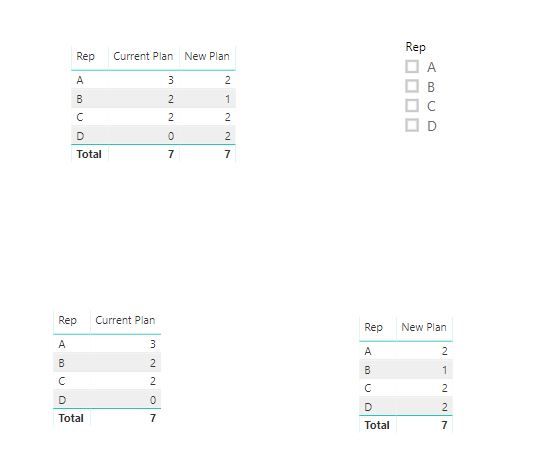
Now, drag Rep field from dim table and two measure into a table visual, and use Rep field from dim table for slicer/filter
and here is sample pbix, please try it.
Best Regards,
Lin
hi, @AZL
You could get it by another way:
Step1:
Create a dim Rep table for slicer.
Step2:
Create two relationship between dim rep table and basic table by Current rep and New rep column(These two relationship must be inactive)
Step3:
Use USERELATIONSHIP Function to create two measure
Current Plan = CALCULATE(COUNTA('Table'[Product]),USERELATIONSHIP('Dim Rep'[Rep],'Table'[Current]))+0
New Plan = CALCULATE(COUNTA('Table'[Product]),USERELATIONSHIP('Dim Rep'[Rep],'Table'[New]))+0
Step4:
Now, drag Rep field from dim table and two measure into a table visual, and use Rep field from dim table for slicer/filter
and here is sample pbix, please try it.
Best Regards,
Lin
@AZL solution attached, everything is done in edit query.
Subscribe to the @PowerBIHowTo YT channel for an upcoming video on List and Record functions in Power Query!!
Learn Power BI and Fabric - subscribe to our YT channel - Click here: @PowerBIHowTo
If my solution proved useful, I'd be delighted to receive Kudos. When you put effort into asking a question, it's equally thoughtful to acknowledge and give Kudos to the individual who helped you solve the problem. It's a small gesture that shows appreciation and encouragement! ❤
Did I answer your question? Mark my post as a solution. Proud to be a Super User! Appreciate your Kudos 🙂
Feel free to email me with any of your BI needs.
Join us in Barcelona for FabCon and SQLCon, the Fabric, Power BI, SQL, and AI community event. Save €200 with code FABCMTY200.
Join Fabric Data Days 2026: 60 days of free live/on-demand sessions, challenges, study groups, and certification opportunities.
| User | Count |
|---|---|
| 23 | |
| 22 | |
| 18 | |
| 17 | |
| 13 |
| User | Count |
|---|---|
| 67 | |
| 50 | |
| 46 | |
| 41 | |
| 39 |