cancel
Showing results for 
Search instead for 
Did you mean: 

Learn from the best! Meet the four finalists headed to the FINALS of the Power BI Dataviz World Championships! Register now

Reply
AZL
Frequent Visitor

Problem with Applying Slicer/Filter

Hello, 


Guys I have the follwoing problems which I hope you will help me solving it.


Capture.JPG


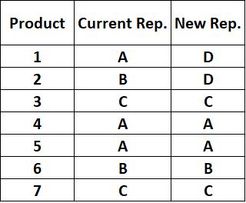
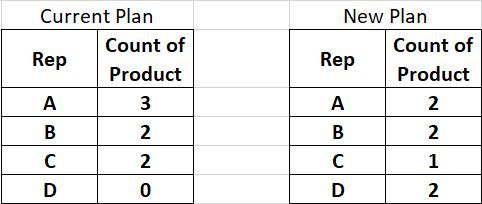
I want to create a page slicer/filter for Rep. to compare how many products each rep. is handling based on current and new plan.Thus, I want to create two tables on the same page with a slice..The first table will represent the current plane and the other table will represent the new plan....something like this:


Capture1.JPG


As you can noticed Rep. "D" is not available in current plan...my question is how can I create one slice/filter with all rep names that will filter both tables correctly.for example in case I select Rep. "D",the current plan table will show nothing while the new plan table will show D = 2 products.


Thanks in advance.


2 ACCEPTED SOLUTIONS
parry2k
Super User
Super User

@AZL solution attached, everything is done in edit query.


Subscribe to the @PowerBIHowTo YT channel for an upcoming video on List and Record functions in Power Query!!

Learn Power BI and Fabric - subscribe to our YT channel - Click here: @PowerBIHowTo

If my solution proved useful, I'd be delighted to receive Kudos. When you put effort into asking a question, it's equally thoughtful to acknowledge and give Kudos to the individual who helped you solve the problem. It's a small gesture that shows appreciation and encouragement! ❤


Did I answer your question? Mark my post as a solution. Proud to be a Super User! Appreciate your Kudos 🙂
Feel free to email me with any of your BI needs.

View solution in original post

v-lili6-msft
Community Support
Community Support

hi, @AZL 

You could get it by another way:

Step1:

Create a dim Rep table for slicer.

Step2:

Create two relationship between dim rep table and basic table by Current rep and New rep column(These two relationship must be inactive)

2.JPG

Step3:

Use USERELATIONSHIP Function to create two measure

Current Plan = CALCULATE(COUNTA('Table'[Product]),USERELATIONSHIP('Dim Rep'[Rep],'Table'[Current]))+0
New Plan = CALCULATE(COUNTA('Table'[Product]),USERELATIONSHIP('Dim Rep'[Rep],'Table'[New]))+0

Step4:

Now, drag Rep field from dim table and two measure into a table visual, and use Rep field from dim table for slicer/filter
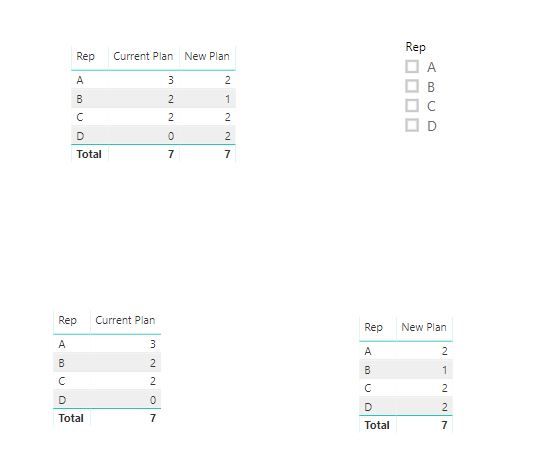
3.JPG

and here is sample pbix, please try it.


Best Regards,

Lin


Community Support Team _ Lin
If this post helps, then please consider Accept it as the solution to help the other members find it more quickly.

View solution in original post

2 REPLIES 2
v-lili6-msft
Community Support
Community Support

hi, @AZL 

You could get it by another way:

Step1:

Create a dim Rep table for slicer.

Step2:

Create two relationship between dim rep table and basic table by Current rep and New rep column(These two relationship must be inactive)

2.JPG

Step3:

Use USERELATIONSHIP Function to create two measure

Current Plan = CALCULATE(COUNTA('Table'[Product]),USERELATIONSHIP('Dim Rep'[Rep],'Table'[Current]))+0
New Plan = CALCULATE(COUNTA('Table'[Product]),USERELATIONSHIP('Dim Rep'[Rep],'Table'[New]))+0

Step4:

Now, drag Rep field from dim table and two measure into a table visual, and use Rep field from dim table for slicer/filter

3.JPG

and here is sample pbix, please try it.


Best Regards,

Lin


Community Support Team _ Lin
If this post helps, then please consider Accept it as the solution to help the other members find it more quickly.
parry2k
Super User
Super User

@AZL solution attached, everything is done in edit query.


Subscribe to the @PowerBIHowTo YT channel for an upcoming video on List and Record functions in Power Query!!

Learn Power BI and Fabric - subscribe to our YT channel - Click here: @PowerBIHowTo

If my solution proved useful, I'd be delighted to receive Kudos. When you put effort into asking a question, it's equally thoughtful to acknowledge and give Kudos to the individual who helped you solve the problem. It's a small gesture that shows appreciation and encouragement! ❤


Did I answer your question? Mark my post as a solution. Proud to be a Super User! Appreciate your Kudos 🙂
Feel free to email me with any of your BI needs.

Helpful resources

Announcements
Power BI DataViz World Championships carousel

Power BI DataViz World Championships - June 2026

A new Power BI DataViz World Championship is coming this June! Don't miss out on submitting your entry.

Join our Fabric User Panel

Join our Fabric User Panel

Share feedback directly with Fabric product managers, participate in targeted research studies and influence the Fabric roadmap.

March Power BI Update Carousel

Power BI Community Update - March 2026

Check out the March 2026 Power BI update to learn about new features.