cancel
Showing results for 
Search instead for 
Did you mean: 

The Power BI Data Visualization World Championships is back! Get ahead of the game and start preparing now! Learn more

Reply
cottrera
Post Prodigy
Post Prodigy

Power Query - Split data onto individual rows

Hi


I have a table in power bi inported from Excel. The rable contains reference number, address, tyoe, materials and height.

Some of the rows have more than 1 refrence number in the cell. The is a ; between each of these numbers.


Reference numberAddressTypeMaterialsHeight
200Flats Dax StreetFlatsBrick3
300Flats Calculate RoadFlatsWood4
400; 500; 600Flats Evaluate RoadFlatsBrick6
100Flats Syntax  StreetFlatsBrick3
700; 800; 900Flats Context RoadFlatsBrick4
50Flats Community StreetFlatsWood8


Is it possible for power query inside of power bi to split these combined reference numbers into now rows. I would like the supporting data in the other columns to also be added to these snew rows.


The result I would exspect is

Reference numberAddressTypeMaterialsHeight
200Flats Dax StreetFlatsBrick3
300Flats Calculate RoadFlatsWood4
400Flats Evaluate RoadFlatsBrick6
500Flats Evaluate RoadFlatsBrick6
600Flats Evaluate RoadFlatsBrick6
100Flats Syntax  StreetFlatsBrick3
700Flats Context RoadFlatsBrick4
800Flats Context RoadFlatsBrick4
900Flats Context RoadFlatsBrick4
50Flats Community StreetFlatsWood

8


thank you


Richard

1 ACCEPTED SOLUTION
selimovd
Super User
Super User

Hey @cottrera ,


yes, that's possible. You can split the values of the columns also by row and not just by column.

I recorded a quick video how you can do that:
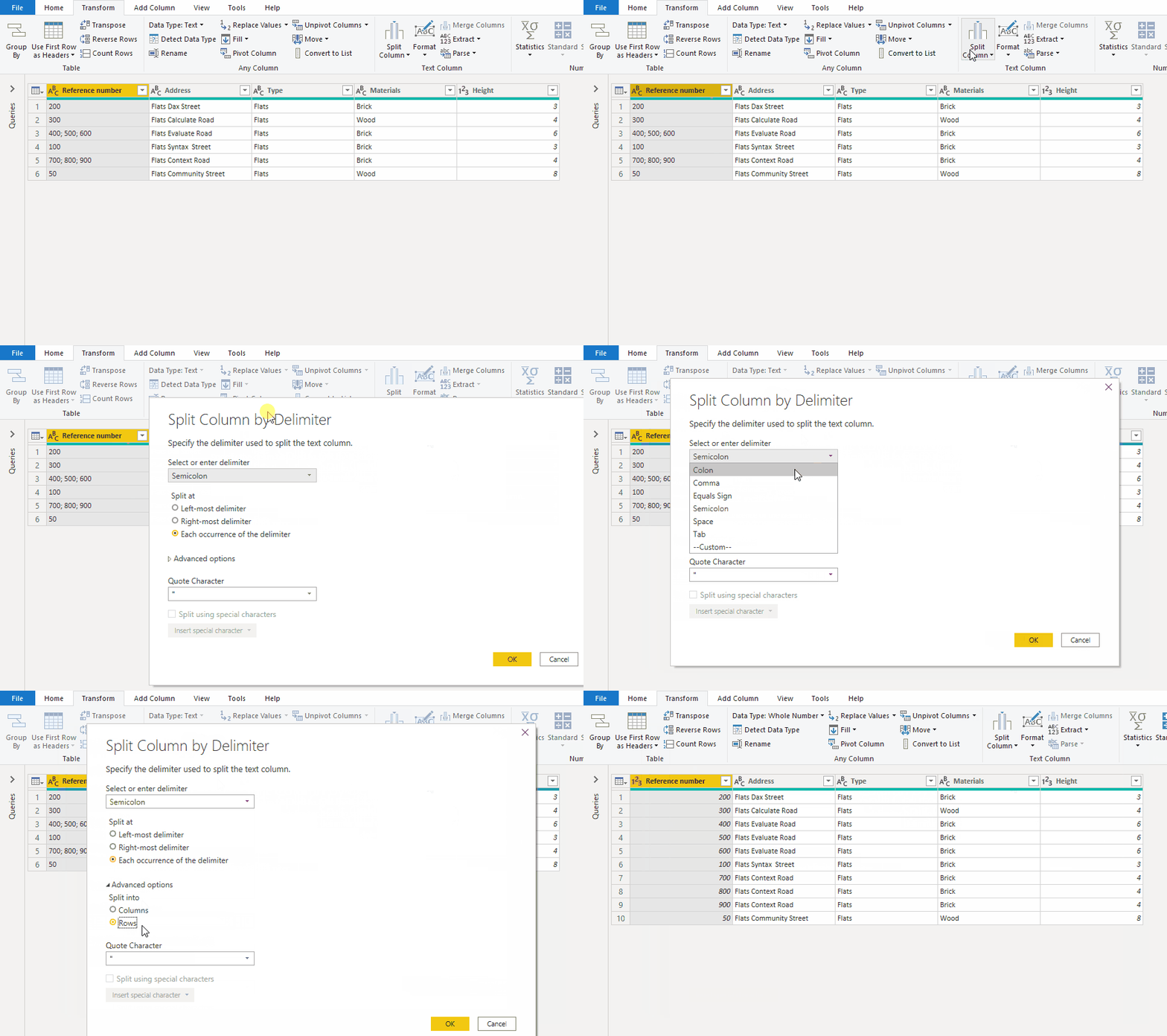
split_rows.gif


As an alternative the result:

let
    Source = Table.FromRows(Json.Document(Binary.Decompress(Binary.FromText("i45WMjIwUNJRcstJLClWcEmsUAguKUpNLYEJAWmnoszkbCBtrBSrE61kjKTcOTEnuRTISlUIyk9MQdISnp8P4pqAdZgYGFgrmIIIMyS9rmWJOaVYtMJsMwPrNUTSEVyZVwJ0HyEHmoNssgARlshOzc8rSa0owWUbxKWmyOpzc0vzMksqMa2Des5CKTYWAA==", BinaryEncoding.Base64), Compression.Deflate)), let _t = ((type nullable text) meta [Serialized.Text = true]) in type table [#"Reference number" = _t, Address = _t, Type = _t, Materials = _t, Height = _t]),
    #"Changed Type" = Table.TransformColumnTypes(Source,{{"Reference number", type text}, {"Address", type text}, {"Type", type text}, {"Materials", type text}, {"Height", Int64.Type}}),
    #"Split Column by Delimiter" = Table.ExpandListColumn(Table.TransformColumns(#"Changed Type", {{"Reference number", Splitter.SplitTextByDelimiter(";", QuoteStyle.Csv), let itemType = (type nullable text) meta [Serialized.Text = true] in type {itemType}}}), "Reference number"),
    #"Changed Type1" = Table.TransformColumnTypes(#"Split Column by Delimiter",{{"Reference number", Int64.Type}})
in
    #"Changed Type1"


If you need any help please let me know.
If I answered your question I would be happy if you could mark my post as a solution ✔️ and give it a thumbs up 👍
 
Best regards
Denis
 

View solution in original post

2 REPLIES 2
cottrera
Post Prodigy
Post Prodigy

Perfect thank you for your quick response😀

selimovd
Super User
Super User

Hey @cottrera ,


yes, that's possible. You can split the values of the columns also by row and not just by column.

I recorded a quick video how you can do that:

split_rows.gif


As an alternative the result:

let
    Source = Table.FromRows(Json.Document(Binary.Decompress(Binary.FromText("i45WMjIwUNJRcstJLClWcEmsUAguKUpNLYEJAWmnoszkbCBtrBSrE61kjKTcOTEnuRTISlUIyk9MQdISnp8P4pqAdZgYGFgrmIIIMyS9rmWJOaVYtMJsMwPrNUTSEVyZVwJ0HyEHmoNssgARlshOzc8rSa0owWUbxKWmyOpzc0vzMksqMa2Des5CKTYWAA==", BinaryEncoding.Base64), Compression.Deflate)), let _t = ((type nullable text) meta [Serialized.Text = true]) in type table [#"Reference number" = _t, Address = _t, Type = _t, Materials = _t, Height = _t]),
    #"Changed Type" = Table.TransformColumnTypes(Source,{{"Reference number", type text}, {"Address", type text}, {"Type", type text}, {"Materials", type text}, {"Height", Int64.Type}}),
    #"Split Column by Delimiter" = Table.ExpandListColumn(Table.TransformColumns(#"Changed Type", {{"Reference number", Splitter.SplitTextByDelimiter(";", QuoteStyle.Csv), let itemType = (type nullable text) meta [Serialized.Text = true] in type {itemType}}}), "Reference number"),
    #"Changed Type1" = Table.TransformColumnTypes(#"Split Column by Delimiter",{{"Reference number", Int64.Type}})
in
    #"Changed Type1"


If you need any help please let me know.
If I answered your question I would be happy if you could mark my post as a solution ✔️ and give it a thumbs up 👍
 
Best regards
Denis
 

Helpful resources

Announcements
November Power BI Update Carousel

Power BI Monthly Update - November 2025

Check out the November 2025 Power BI update to learn about new features.

Fabric Data Days Carousel

Fabric Data Days

Advance your Data & AI career with 50 days of live learning, contests, hands-on challenges, study groups & certifications and more!

FabCon Atlanta 2026 carousel

FabCon Atlanta 2026

Join us at FabCon Atlanta, March 16-20, for the ultimate Fabric, Power BI, AI and SQL community-led event. Save $200 with code FABCOMM.

Top Solution Authors
Top Kudoed Authors