Join us at FabCon Atlanta from March 16 - 20, 2026, for the ultimate Fabric, Power BI, AI and SQL community-led event. Save $200 with code FABCOMM.
Register now!The Power BI Data Visualization World Championships is back! Get ahead of the game and start preparing now! Learn more
Hi
I have a table in power bi inported from Excel. The rable contains reference number, address, tyoe, materials and height.
Some of the rows have more than 1 refrence number in the cell. The is a ; between each of these numbers.
| Reference number | Address | Type | Materials | Height |
| 200 | Flats Dax Street | Flats | Brick | 3 |
| 300 | Flats Calculate Road | Flats | Wood | 4 |
| 400; 500; 600 | Flats Evaluate Road | Flats | Brick | 6 |
| 100 | Flats Syntax Street | Flats | Brick | 3 |
| 700; 800; 900 | Flats Context Road | Flats | Brick | 4 |
| 50 | Flats Community Street | Flats | Wood | 8 |
Is it possible for power query inside of power bi to split these combined reference numbers into now rows. I would like the supporting data in the other columns to also be added to these snew rows.
The result I would exspect is
| Reference number | Address | Type | Materials | Height |
| 200 | Flats Dax Street | Flats | Brick | 3 |
| 300 | Flats Calculate Road | Flats | Wood | 4 |
| 400 | Flats Evaluate Road | Flats | Brick | 6 |
| 500 | Flats Evaluate Road | Flats | Brick | 6 |
| 600 | Flats Evaluate Road | Flats | Brick | 6 |
| 100 | Flats Syntax Street | Flats | Brick | 3 |
| 700 | Flats Context Road | Flats | Brick | 4 |
| 800 | Flats Context Road | Flats | Brick | 4 |
| 900 | Flats Context Road | Flats | Brick | 4 |
| 50 | Flats Community Street | Flats | Wood | 8 |
thank you
Richard
Solved! Go to Solution.
Hey @cottrera ,
yes, that's possible. You can split the values of the columns also by row and not just by column.
I recorded a quick video how you can do that:
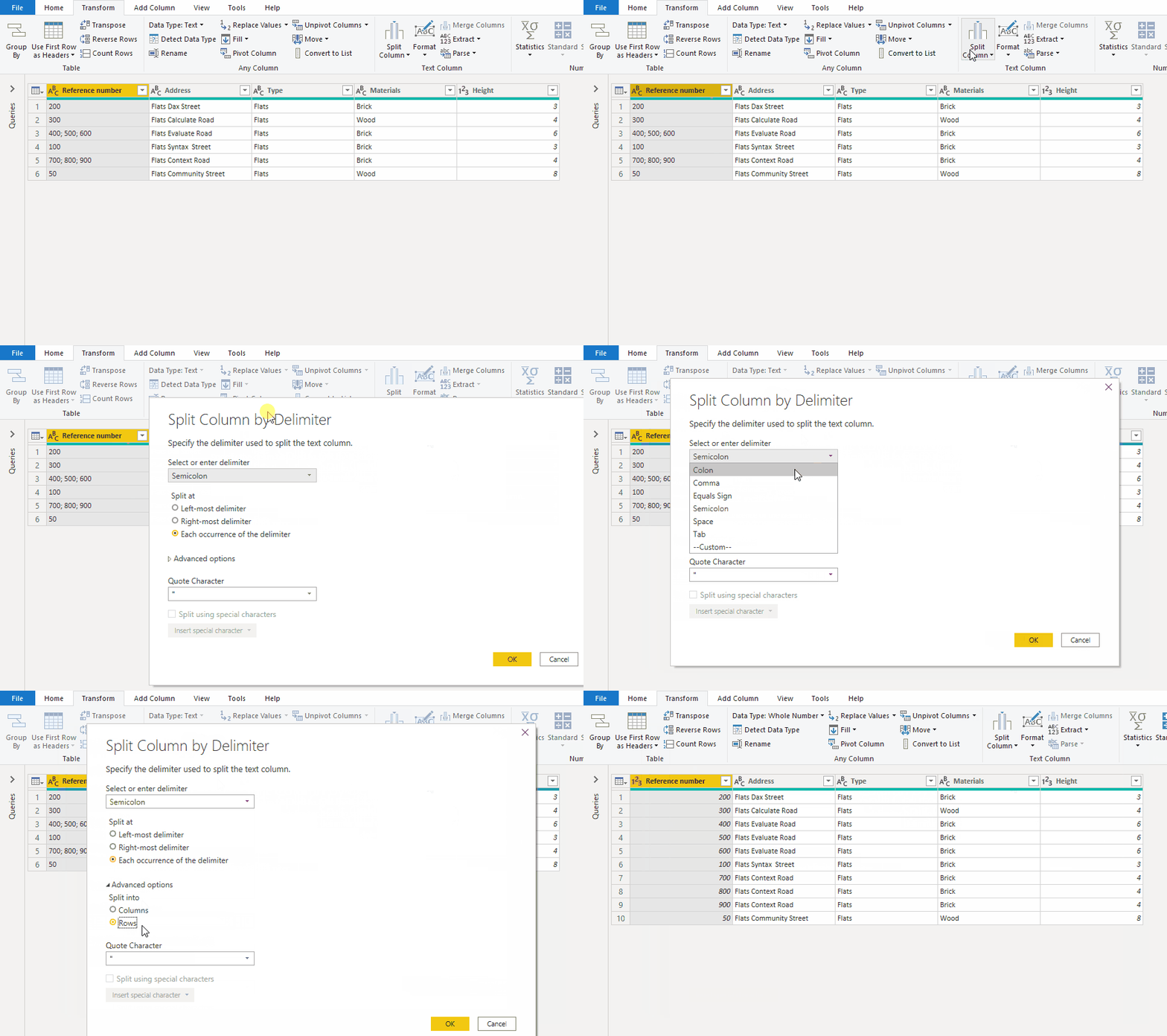
As an alternative the result:
let
Source = Table.FromRows(Json.Document(Binary.Decompress(Binary.FromText("i45WMjIwUNJRcstJLClWcEmsUAguKUpNLYEJAWmnoszkbCBtrBSrE61kjKTcOTEnuRTISlUIyk9MQdISnp8P4pqAdZgYGFgrmIIIMyS9rmWJOaVYtMJsMwPrNUTSEVyZVwJ0HyEHmoNssgARlshOzc8rSa0owWUbxKWmyOpzc0vzMksqMa2Des5CKTYWAA==", BinaryEncoding.Base64), Compression.Deflate)), let _t = ((type nullable text) meta [Serialized.Text = true]) in type table [#"Reference number" = _t, Address = _t, Type = _t, Materials = _t, Height = _t]),
#"Changed Type" = Table.TransformColumnTypes(Source,{{"Reference number", type text}, {"Address", type text}, {"Type", type text}, {"Materials", type text}, {"Height", Int64.Type}}),
#"Split Column by Delimiter" = Table.ExpandListColumn(Table.TransformColumns(#"Changed Type", {{"Reference number", Splitter.SplitTextByDelimiter(";", QuoteStyle.Csv), let itemType = (type nullable text) meta [Serialized.Text = true] in type {itemType}}}), "Reference number"),
#"Changed Type1" = Table.TransformColumnTypes(#"Split Column by Delimiter",{{"Reference number", Int64.Type}})
in
#"Changed Type1"
Perfect thank you for your quick response😀
Hey @cottrera ,
yes, that's possible. You can split the values of the columns also by row and not just by column.
I recorded a quick video how you can do that:
As an alternative the result:
let
Source = Table.FromRows(Json.Document(Binary.Decompress(Binary.FromText("i45WMjIwUNJRcstJLClWcEmsUAguKUpNLYEJAWmnoszkbCBtrBSrE61kjKTcOTEnuRTISlUIyk9MQdISnp8P4pqAdZgYGFgrmIIIMyS9rmWJOaVYtMJsMwPrNUTSEVyZVwJ0HyEHmoNssgARlshOzc8rSa0owWUbxKWmyOpzc0vzMksqMa2Des5CKTYWAA==", BinaryEncoding.Base64), Compression.Deflate)), let _t = ((type nullable text) meta [Serialized.Text = true]) in type table [#"Reference number" = _t, Address = _t, Type = _t, Materials = _t, Height = _t]),
#"Changed Type" = Table.TransformColumnTypes(Source,{{"Reference number", type text}, {"Address", type text}, {"Type", type text}, {"Materials", type text}, {"Height", Int64.Type}}),
#"Split Column by Delimiter" = Table.ExpandListColumn(Table.TransformColumns(#"Changed Type", {{"Reference number", Splitter.SplitTextByDelimiter(";", QuoteStyle.Csv), let itemType = (type nullable text) meta [Serialized.Text = true] in type {itemType}}}), "Reference number"),
#"Changed Type1" = Table.TransformColumnTypes(#"Split Column by Delimiter",{{"Reference number", Int64.Type}})
in
#"Changed Type1"
The Power BI Data Visualization World Championships is back! Get ahead of the game and start preparing now!
Check out the November 2025 Power BI update to learn about new features.
| User | Count |
|---|---|
| 65 | |
| 44 | |
| 40 | |
| 29 | |
| 19 |
| User | Count |
|---|---|
| 200 | |
| 130 | |
| 102 | |
| 72 | |
| 55 |