Share feedback directly with Fabric product managers, participate in targeted research studies and influence the Fabric roadmap.
Sign up nowGet Fabric certified for FREE! Don't miss your chance! Learn more
Hello All,
I created a Power BI Report with RLS, so that the logged in user can see only his records in the report. I tried everything from this link. After validating the role within Power BI service, the report works when i test the data as role. But when I go to the work space and click on the report link it does nor work as expected. It does not filter the recoeds based on logged in user. I tried publishing the report to a SharePoint Online page. It doesnt work there either. Please let me know where i am going wrong.
Solved! Go to Solution.
Hi @Snighdha
Try to change the workspace privacy (Edit Workspace option) to "Members can only view Power BI content".
Regards
BILASolution
Hi @Snighdha
Try to change the workspace privacy (Edit Workspace option) to "Members can only view Power BI content".
Regards
BILASolution
Hi @BILASolution,
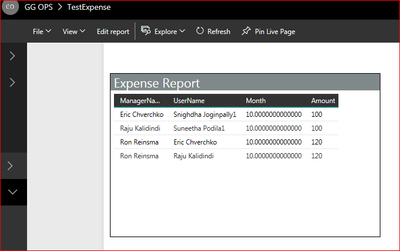
Thnak you fo rthe reply. I edited worspace and changed the privacy option to "Members can only view Power BI content", but still all the records. Please see below screen shot -
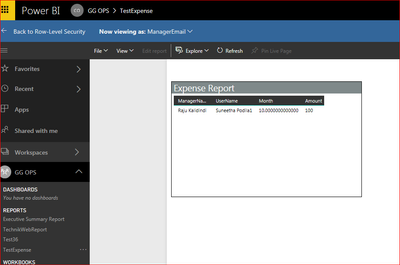
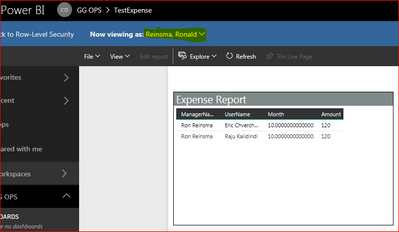
Where as when I test as role I see correct data. Please see screen shot below -
Yes. Users are added to the role and I tested the role with different user's name and it works.
If you love stickers, then you will definitely want to check out our Community Sticker Challenge!
Check out the January 2026 Power BI update to learn about new features.
| User | Count |
|---|---|
| 62 | |
| 61 | |
| 42 | |
| 21 | |
| 18 |
| User | Count |
|---|---|
| 122 | |
| 117 | |
| 37 | |
| 34 | |
| 30 |