This is best Fabric, Power BI, SQL and AI community event. How do we know? The last event sold out! Save €200 with code FABCMTY200.
Register nowA new Data Days event is coming soon! This time we’re going bigger than ever. Fabric, Power BI, SQL, AI and more. Don't miss out.
Hello All,
I created a Power BI Report with RLS, so that the logged in user can see only his records in the report. I tried everything from this link. After validating the role within Power BI service, the report works when i test the data as role. But when I go to the work space and click on the report link it does nor work as expected. It does not filter the recoeds based on logged in user. I tried publishing the report to a SharePoint Online page. It doesnt work there either. Please let me know where i am going wrong.
Solved! Go to Solution.
Hi @Snighdha
Try to change the workspace privacy (Edit Workspace option) to "Members can only view Power BI content".
Regards
BILASolution
Hi @Snighdha
Try to change the workspace privacy (Edit Workspace option) to "Members can only view Power BI content".
Regards
BILASolution
Hi @BILASolution,
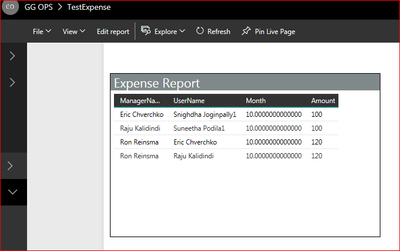
Thnak you fo rthe reply. I edited worspace and changed the privacy option to "Members can only view Power BI content", but still all the records. Please see below screen shot -
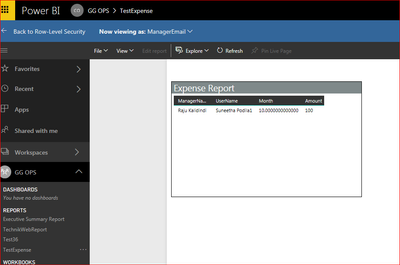
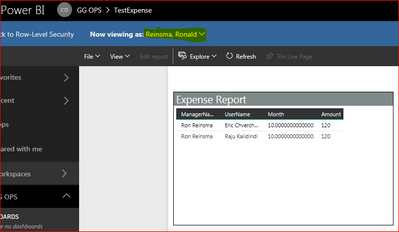
Where as when I test as role I see correct data. Please see screen shot below -
Yes. Users are added to the role and I tested the role with different user's name and it works.
Sign up to receive a private message when registration opens and key events begin.
If you have recently started exploring Fabric, we'd love to hear how it's going. Your feedback can help with product improvements.
| User | Count |
|---|---|
| 32 | |
| 26 | |
| 21 | |
| 20 | |
| 15 |
| User | Count |
|---|---|
| 65 | |
| 41 | |
| 28 | |
| 22 | |
| 22 |