cancel
Showing results for 
Search instead for 
Did you mean: 

July 7 - July 17 | Round 2 of the Power BI Dataviz World Championships. Don't miss your chance! Learn more

Reply
RAdams
Helper III
Helper III

Pivoting Multiple Rows into Columns

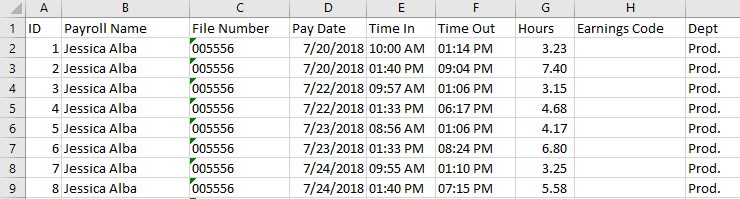
I have some payroll data in the below format for punching in and punching out. 


EXCEL_2019-05-28_19-26-32.png


I would like to pivot/unpivot into the below format. I'm confused with the method of pivoting I need to use to convert. I've been working on this for a couple hours but I know I'm missing something. Any help or tips would be appreciated. 


EXCEL_2019-05-28_19-29-04.png

1 ACCEPTED SOLUTION

Hi,

This M code works

let
    Source = Excel.CurrentWorkbook(){[Name="Data"]}[Content],
    #"Changed Type" = Table.TransformColumnTypes(Source,{{"ID", Int64.Type}, {"Payroll Name", type text}, {"File Number", Int64.Type}, {"Pay Date", type datetime}, {"Time In", type number}, {"Time Out", type number}, {"Hours", type number}, {"Earnings Code", type any}, {"Dept", type text}}),
    #"Unpivoted Other Columns" = Table.UnpivotOtherColumns(#"Changed Type", {"ID", "Payroll Name", "File Number", "Pay Date"}, "Attribute", "Value"),
    #"Inserted Merged Column" = Table.AddColumn(#"Unpivoted Other Columns", "Merged", each Text.Combine({Text.From([File Number], "en-IN"), Text.From([Pay Date], "en-IN"), [Attribute]}, ""), type text),
    Partition = Table.Group(#"Inserted Merged Column", {"Merged"}, {{"Partition", each Table.AddIndexColumn(_, "Index",1,1), type table}}),
    #"Expanded Partition" = Table.ExpandTableColumn(Partition, "Partition", {"ID", "Payroll Name", "File Number", "Pay Date", "Attribute", "Value", "Index"}, {"ID", "Payroll Name", "File Number", "Pay Date", "Attribute", "Value", "Index"}),
    #"Removed Columns" = Table.RemoveColumns(#"Expanded Partition",{"Merged"}),
    #"Inserted Merged Column1" = Table.AddColumn(#"Removed Columns", "Merged", each Text.Combine({[Attribute], Text.From([Index], "en-IN")}, " "), type text),
    #"Removed Columns1" = Table.RemoveColumns(#"Inserted Merged Column1",{"Attribute", "Index", "ID"}),
    #"Pivoted Column" = Table.Pivot(#"Removed Columns1", List.Distinct(#"Removed Columns1"[Merged]), "Merged", "Value"),
    #"Reordered Columns" = Table.ReorderColumns(#"Pivoted Column",{"Payroll Name", "File Number", "Pay Date", "Time In 1", "Time Out 1", "Hours 1", "Dept 1", "Time In 2", "Time Out 2", "Hours 2", "Dept 2"}),
    #"Changed Type1" = Table.TransformColumnTypes(#"Reordered Columns",{{"Time In 1", type time}, {"Time Out 1", type time}, {"Hours 1", type number}, {"Time In 2", type time}, {"Time Out 2", type time}, {"Hours 2", type number}})
in
    #"Changed Type1"

Hope this helps.

Untitled.png


Regards,
Ashish Mathur
http://www.ashishmathur.com
https://www.linkedin.com/in/excelenthusiasts/

View solution in original post

4 REPLIES 4
Ashish_Mathur
Super User
Super User

Hi,

Share the link from where i can download your Excel file.


Regards,
Ashish Mathur
http://www.ashishmathur.com
https://www.linkedin.com/in/excelenthusiasts/

Hi,

This M code works

let
    Source = Excel.CurrentWorkbook(){[Name="Data"]}[Content],
    #"Changed Type" = Table.TransformColumnTypes(Source,{{"ID", Int64.Type}, {"Payroll Name", type text}, {"File Number", Int64.Type}, {"Pay Date", type datetime}, {"Time In", type number}, {"Time Out", type number}, {"Hours", type number}, {"Earnings Code", type any}, {"Dept", type text}}),
    #"Unpivoted Other Columns" = Table.UnpivotOtherColumns(#"Changed Type", {"ID", "Payroll Name", "File Number", "Pay Date"}, "Attribute", "Value"),
    #"Inserted Merged Column" = Table.AddColumn(#"Unpivoted Other Columns", "Merged", each Text.Combine({Text.From([File Number], "en-IN"), Text.From([Pay Date], "en-IN"), [Attribute]}, ""), type text),
    Partition = Table.Group(#"Inserted Merged Column", {"Merged"}, {{"Partition", each Table.AddIndexColumn(_, "Index",1,1), type table}}),
    #"Expanded Partition" = Table.ExpandTableColumn(Partition, "Partition", {"ID", "Payroll Name", "File Number", "Pay Date", "Attribute", "Value", "Index"}, {"ID", "Payroll Name", "File Number", "Pay Date", "Attribute", "Value", "Index"}),
    #"Removed Columns" = Table.RemoveColumns(#"Expanded Partition",{"Merged"}),
    #"Inserted Merged Column1" = Table.AddColumn(#"Removed Columns", "Merged", each Text.Combine({[Attribute], Text.From([Index], "en-IN")}, " "), type text),
    #"Removed Columns1" = Table.RemoveColumns(#"Inserted Merged Column1",{"Attribute", "Index", "ID"}),
    #"Pivoted Column" = Table.Pivot(#"Removed Columns1", List.Distinct(#"Removed Columns1"[Merged]), "Merged", "Value"),
    #"Reordered Columns" = Table.ReorderColumns(#"Pivoted Column",{"Payroll Name", "File Number", "Pay Date", "Time In 1", "Time Out 1", "Hours 1", "Dept 1", "Time In 2", "Time Out 2", "Hours 2", "Dept 2"}),
    #"Changed Type1" = Table.TransformColumnTypes(#"Reordered Columns",{{"Time In 1", type time}, {"Time Out 1", type time}, {"Hours 1", type number}, {"Time In 2", type time}, {"Time Out 2", type time}, {"Hours 2", type number}})
in
    #"Changed Type1"

Hope this helps.

Untitled.png


Regards,
Ashish Mathur
http://www.ashishmathur.com
https://www.linkedin.com/in/excelenthusiasts/
Wow. Thanks for your help. I'm going to give it a try as soon as I get into work! I'll let you know. 

Thanks again.

R

Helpful resources

Announcements
FabCon and SQLCon Barcelona 2026

FabCon & SQLCon – Barcelona 2026

Join us in Barcelona for FabCon and SQLCon, the Fabric, Power BI, SQL, and AI community event. Save €200 with code FABCMTY200.

60 days of Data Days Carousel

Data Days 2026

Join Fabric Data Days 2026: 60 days of free live/on-demand sessions, challenges, study groups, and certification opportunities.

Power BI DataViz World Championships carousel

Power BI DataViz World Championships - June 2026

A new Power BI DataViz World Championship is coming this June! Don't miss out on submitting your entry.