This time we’re going bigger than ever. Fabric, Power BI, SQL, AI and more. We're covering it all. You won't want to miss it.
Learn moreLevel up your Power BI skills this month - build one visual each week and tell better stories with data! Get started
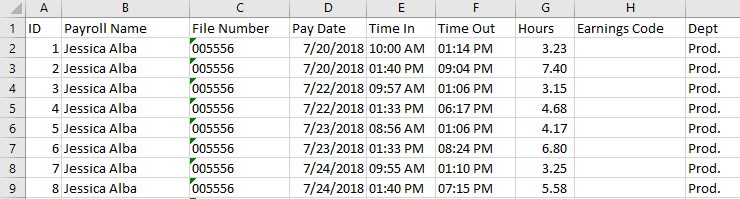
I have some payroll data in the below format for punching in and punching out.
I would like to pivot/unpivot into the below format. I'm confused with the method of pivoting I need to use to convert. I've been working on this for a couple hours but I know I'm missing something. Any help or tips would be appreciated.
Solved! Go to Solution.
Hi,
This M code works
let
Source = Excel.CurrentWorkbook(){[Name="Data"]}[Content],
#"Changed Type" = Table.TransformColumnTypes(Source,{{"ID", Int64.Type}, {"Payroll Name", type text}, {"File Number", Int64.Type}, {"Pay Date", type datetime}, {"Time In", type number}, {"Time Out", type number}, {"Hours", type number}, {"Earnings Code", type any}, {"Dept", type text}}),
#"Unpivoted Other Columns" = Table.UnpivotOtherColumns(#"Changed Type", {"ID", "Payroll Name", "File Number", "Pay Date"}, "Attribute", "Value"),
#"Inserted Merged Column" = Table.AddColumn(#"Unpivoted Other Columns", "Merged", each Text.Combine({Text.From([File Number], "en-IN"), Text.From([Pay Date], "en-IN"), [Attribute]}, ""), type text),
Partition = Table.Group(#"Inserted Merged Column", {"Merged"}, {{"Partition", each Table.AddIndexColumn(_, "Index",1,1), type table}}),
#"Expanded Partition" = Table.ExpandTableColumn(Partition, "Partition", {"ID", "Payroll Name", "File Number", "Pay Date", "Attribute", "Value", "Index"}, {"ID", "Payroll Name", "File Number", "Pay Date", "Attribute", "Value", "Index"}),
#"Removed Columns" = Table.RemoveColumns(#"Expanded Partition",{"Merged"}),
#"Inserted Merged Column1" = Table.AddColumn(#"Removed Columns", "Merged", each Text.Combine({[Attribute], Text.From([Index], "en-IN")}, " "), type text),
#"Removed Columns1" = Table.RemoveColumns(#"Inserted Merged Column1",{"Attribute", "Index", "ID"}),
#"Pivoted Column" = Table.Pivot(#"Removed Columns1", List.Distinct(#"Removed Columns1"[Merged]), "Merged", "Value"),
#"Reordered Columns" = Table.ReorderColumns(#"Pivoted Column",{"Payroll Name", "File Number", "Pay Date", "Time In 1", "Time Out 1", "Hours 1", "Dept 1", "Time In 2", "Time Out 2", "Hours 2", "Dept 2"}),
#"Changed Type1" = Table.TransformColumnTypes(#"Reordered Columns",{{"Time In 1", type time}, {"Time Out 1", type time}, {"Hours 1", type number}, {"Time In 2", type time}, {"Time Out 2", type time}, {"Hours 2", type number}})
in
#"Changed Type1"
Hope this helps.
Hi,
Share the link from where i can download your Excel file.
Here is the file @Ashish_Mathur :
https://www.dropbox.com/s/2jbrw5f4tbqv8lt/payrollshare.csv?dl=0
Thanks for any help.
R
Hi,
This M code works
let
Source = Excel.CurrentWorkbook(){[Name="Data"]}[Content],
#"Changed Type" = Table.TransformColumnTypes(Source,{{"ID", Int64.Type}, {"Payroll Name", type text}, {"File Number", Int64.Type}, {"Pay Date", type datetime}, {"Time In", type number}, {"Time Out", type number}, {"Hours", type number}, {"Earnings Code", type any}, {"Dept", type text}}),
#"Unpivoted Other Columns" = Table.UnpivotOtherColumns(#"Changed Type", {"ID", "Payroll Name", "File Number", "Pay Date"}, "Attribute", "Value"),
#"Inserted Merged Column" = Table.AddColumn(#"Unpivoted Other Columns", "Merged", each Text.Combine({Text.From([File Number], "en-IN"), Text.From([Pay Date], "en-IN"), [Attribute]}, ""), type text),
Partition = Table.Group(#"Inserted Merged Column", {"Merged"}, {{"Partition", each Table.AddIndexColumn(_, "Index",1,1), type table}}),
#"Expanded Partition" = Table.ExpandTableColumn(Partition, "Partition", {"ID", "Payroll Name", "File Number", "Pay Date", "Attribute", "Value", "Index"}, {"ID", "Payroll Name", "File Number", "Pay Date", "Attribute", "Value", "Index"}),
#"Removed Columns" = Table.RemoveColumns(#"Expanded Partition",{"Merged"}),
#"Inserted Merged Column1" = Table.AddColumn(#"Removed Columns", "Merged", each Text.Combine({[Attribute], Text.From([Index], "en-IN")}, " "), type text),
#"Removed Columns1" = Table.RemoveColumns(#"Inserted Merged Column1",{"Attribute", "Index", "ID"}),
#"Pivoted Column" = Table.Pivot(#"Removed Columns1", List.Distinct(#"Removed Columns1"[Merged]), "Merged", "Value"),
#"Reordered Columns" = Table.ReorderColumns(#"Pivoted Column",{"Payroll Name", "File Number", "Pay Date", "Time In 1", "Time Out 1", "Hours 1", "Dept 1", "Time In 2", "Time Out 2", "Hours 2", "Dept 2"}),
#"Changed Type1" = Table.TransformColumnTypes(#"Reordered Columns",{{"Time In 1", type time}, {"Time Out 1", type time}, {"Hours 1", type number}, {"Time In 2", type time}, {"Time Out 2", type time}, {"Hours 2", type number}})
in
#"Changed Type1"
Hope this helps.
Wow. Thanks for your help. I'm going to give it a try as soon as I get into work! I'll let you know.
Thanks again.
R
Check out the April 2026 Power BI update to learn about new features.
Sign up to receive a private message when registration opens and key events begin.
If you have recently started exploring Fabric, we'd love to hear how it's going. Your feedback can help with product improvements.
| User | Count |
|---|---|
| 36 | |
| 33 | |
| 31 | |
| 24 | |
| 18 |
| User | Count |
|---|---|
| 70 | |
| 50 | |
| 33 | |
| 24 | |
| 24 |