cancel
Showing results for 
Search instead for 
Did you mean: 

The Power BI Data Visualization World Championships is back! Get ahead of the game and start preparing now! Learn more

Reply
RAdams
Helper III
Helper III

Pivoting Multiple Rows into Columns

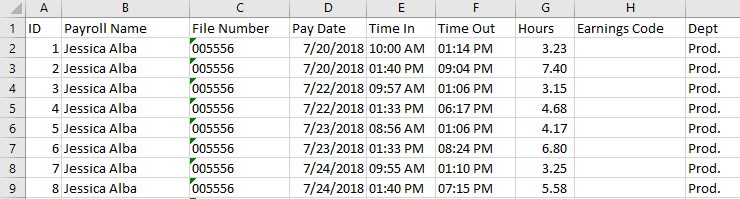
I have some payroll data in the below format for punching in and punching out. 


EXCEL_2019-05-28_19-26-32.png


I would like to pivot/unpivot into the below format. I'm confused with the method of pivoting I need to use to convert. I've been working on this for a couple hours but I know I'm missing something. Any help or tips would be appreciated. 


EXCEL_2019-05-28_19-29-04.png

1 ACCEPTED SOLUTION

Hi,

This M code works

let
    Source = Excel.CurrentWorkbook(){[Name="Data"]}[Content],
    #"Changed Type" = Table.TransformColumnTypes(Source,{{"ID", Int64.Type}, {"Payroll Name", type text}, {"File Number", Int64.Type}, {"Pay Date", type datetime}, {"Time In", type number}, {"Time Out", type number}, {"Hours", type number}, {"Earnings Code", type any}, {"Dept", type text}}),
    #"Unpivoted Other Columns" = Table.UnpivotOtherColumns(#"Changed Type", {"ID", "Payroll Name", "File Number", "Pay Date"}, "Attribute", "Value"),
    #"Inserted Merged Column" = Table.AddColumn(#"Unpivoted Other Columns", "Merged", each Text.Combine({Text.From([File Number], "en-IN"), Text.From([Pay Date], "en-IN"), [Attribute]}, ""), type text),
    Partition = Table.Group(#"Inserted Merged Column", {"Merged"}, {{"Partition", each Table.AddIndexColumn(_, "Index",1,1), type table}}),
    #"Expanded Partition" = Table.ExpandTableColumn(Partition, "Partition", {"ID", "Payroll Name", "File Number", "Pay Date", "Attribute", "Value", "Index"}, {"ID", "Payroll Name", "File Number", "Pay Date", "Attribute", "Value", "Index"}),
    #"Removed Columns" = Table.RemoveColumns(#"Expanded Partition",{"Merged"}),
    #"Inserted Merged Column1" = Table.AddColumn(#"Removed Columns", "Merged", each Text.Combine({[Attribute], Text.From([Index], "en-IN")}, " "), type text),
    #"Removed Columns1" = Table.RemoveColumns(#"Inserted Merged Column1",{"Attribute", "Index", "ID"}),
    #"Pivoted Column" = Table.Pivot(#"Removed Columns1", List.Distinct(#"Removed Columns1"[Merged]), "Merged", "Value"),
    #"Reordered Columns" = Table.ReorderColumns(#"Pivoted Column",{"Payroll Name", "File Number", "Pay Date", "Time In 1", "Time Out 1", "Hours 1", "Dept 1", "Time In 2", "Time Out 2", "Hours 2", "Dept 2"}),
    #"Changed Type1" = Table.TransformColumnTypes(#"Reordered Columns",{{"Time In 1", type time}, {"Time Out 1", type time}, {"Hours 1", type number}, {"Time In 2", type time}, {"Time Out 2", type time}, {"Hours 2", type number}})
in
    #"Changed Type1"

Hope this helps.

Untitled.png


Regards,
Ashish Mathur
http://www.ashishmathur.com
https://www.linkedin.com/in/excelenthusiasts/

View solution in original post

4 REPLIES 4
Ashish_Mathur
Super User
Super User

Hi,

Share the link from where i can download your Excel file.


Regards,
Ashish Mathur
http://www.ashishmathur.com
https://www.linkedin.com/in/excelenthusiasts/

Hi,

This M code works

let
    Source = Excel.CurrentWorkbook(){[Name="Data"]}[Content],
    #"Changed Type" = Table.TransformColumnTypes(Source,{{"ID", Int64.Type}, {"Payroll Name", type text}, {"File Number", Int64.Type}, {"Pay Date", type datetime}, {"Time In", type number}, {"Time Out", type number}, {"Hours", type number}, {"Earnings Code", type any}, {"Dept", type text}}),
    #"Unpivoted Other Columns" = Table.UnpivotOtherColumns(#"Changed Type", {"ID", "Payroll Name", "File Number", "Pay Date"}, "Attribute", "Value"),
    #"Inserted Merged Column" = Table.AddColumn(#"Unpivoted Other Columns", "Merged", each Text.Combine({Text.From([File Number], "en-IN"), Text.From([Pay Date], "en-IN"), [Attribute]}, ""), type text),
    Partition = Table.Group(#"Inserted Merged Column", {"Merged"}, {{"Partition", each Table.AddIndexColumn(_, "Index",1,1), type table}}),
    #"Expanded Partition" = Table.ExpandTableColumn(Partition, "Partition", {"ID", "Payroll Name", "File Number", "Pay Date", "Attribute", "Value", "Index"}, {"ID", "Payroll Name", "File Number", "Pay Date", "Attribute", "Value", "Index"}),
    #"Removed Columns" = Table.RemoveColumns(#"Expanded Partition",{"Merged"}),
    #"Inserted Merged Column1" = Table.AddColumn(#"Removed Columns", "Merged", each Text.Combine({[Attribute], Text.From([Index], "en-IN")}, " "), type text),
    #"Removed Columns1" = Table.RemoveColumns(#"Inserted Merged Column1",{"Attribute", "Index", "ID"}),
    #"Pivoted Column" = Table.Pivot(#"Removed Columns1", List.Distinct(#"Removed Columns1"[Merged]), "Merged", "Value"),
    #"Reordered Columns" = Table.ReorderColumns(#"Pivoted Column",{"Payroll Name", "File Number", "Pay Date", "Time In 1", "Time Out 1", "Hours 1", "Dept 1", "Time In 2", "Time Out 2", "Hours 2", "Dept 2"}),
    #"Changed Type1" = Table.TransformColumnTypes(#"Reordered Columns",{{"Time In 1", type time}, {"Time Out 1", type time}, {"Hours 1", type number}, {"Time In 2", type time}, {"Time Out 2", type time}, {"Hours 2", type number}})
in
    #"Changed Type1"

Hope this helps.

Untitled.png


Regards,
Ashish Mathur
http://www.ashishmathur.com
https://www.linkedin.com/in/excelenthusiasts/
Wow. Thanks for your help. I'm going to give it a try as soon as I get into work! I'll let you know. 

Thanks again.

R

Helpful resources

Announcements
Power BI DataViz World Championships

Power BI Dataviz World Championships

The Power BI Data Visualization World Championships is back! Get ahead of the game and start preparing now!

December 2025 Power BI Update Carousel

Power BI Monthly Update - December 2025

Check out the December 2025 Power BI Holiday Recap!

FabCon Atlanta 2026 carousel

FabCon Atlanta 2026

Join us at FabCon Atlanta, March 16-20, for the ultimate Fabric, Power BI, AI and SQL community-led event. Save $200 with code FABCOMM.

Top Solution Authors