
Share feedback directly with Fabric product managers, participate in targeted research studies and influence the Fabric roadmap.
Sign up nowGet Fabric certified for FREE! Don't miss your chance! Learn more
Just checking I am not wrong here - you can't Pivot columns when using DirectQuery mode?
Is there a generic sub-query I can alter for a workaround? I am clueless with SQL so if this is at all complex I will have to think of another way.
Solved! Go to Solution.
Hi @Gingerjeans88 ,
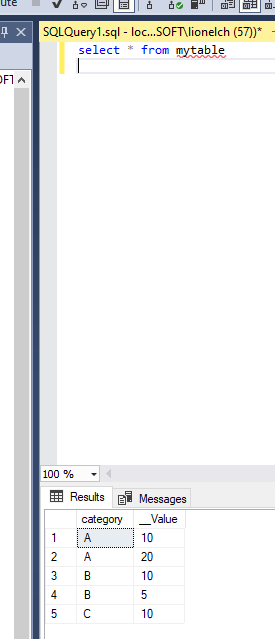
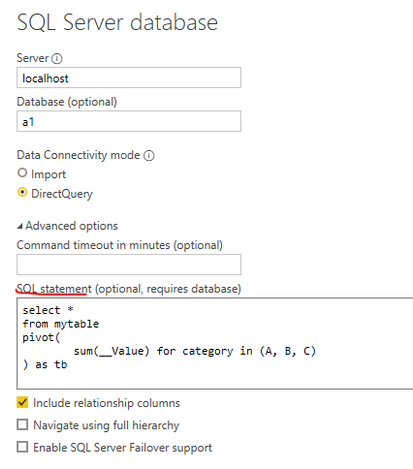
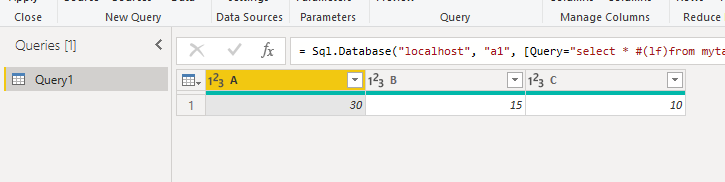
Or you can pivot the columns with SQL.
Using PIVOT and UNPIVOT - SQL Server | Microsoft Docs
Hi @Gingerjeans88 ,
Or you can pivot the columns with SQL.
Using PIVOT and UNPIVOT - SQL Server | Microsoft Docs
@Gingerjeans88 , No you can not. For that, you need to convert the table to import mode. But pivot means a new column, you should be able to create a measure with some filters. If you do not need too many
Share feedback directly with Fabric product managers, participate in targeted research studies and influence the Fabric roadmap.
If you love stickers, then you will definitely want to check out our Community Sticker Challenge!
Check out the January 2026 Power BI update to learn about new features.
| User | Count |
|---|---|
| 62 | |
| 62 | |
| 42 | |
| 21 | |
| 18 |
| User | Count |
|---|---|
| 120 | |
| 113 | |
| 38 | |
| 29 | |
| 28 |