
Join us at FabCon Atlanta from March 16 - 20, 2026, for the ultimate Fabric, Power BI, AI and SQL community-led event. Save $200 with code FABCOMM.
Register now!The Power BI Data Visualization World Championships is back! It's time to submit your entry. Live now!
Just checking I am not wrong here - you can't Pivot columns when using DirectQuery mode?
Is there a generic sub-query I can alter for a workaround? I am clueless with SQL so if this is at all complex I will have to think of another way.
Solved! Go to Solution.
Hi @Gingerjeans88 ,
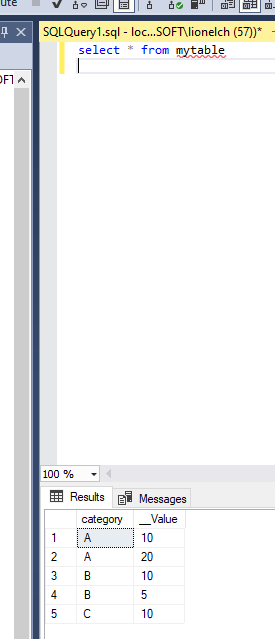
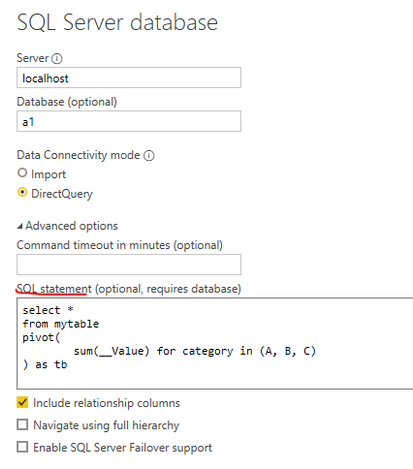
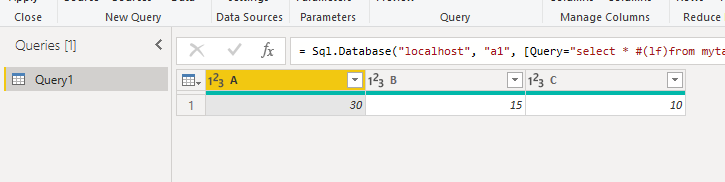
Or you can pivot the columns with SQL.
Using PIVOT and UNPIVOT - SQL Server | Microsoft Docs
Hi @Gingerjeans88 ,
Or you can pivot the columns with SQL.
Using PIVOT and UNPIVOT - SQL Server | Microsoft Docs
@Gingerjeans88 , No you can not. For that, you need to convert the table to import mode. But pivot means a new column, you should be able to create a measure with some filters. If you do not need too many
The Power BI Data Visualization World Championships is back! It's time to submit your entry.
Check out the January 2026 Power BI update to learn about new features.
| User | Count |
|---|---|
| 60 | |
| 41 | |
| 27 | |
| 26 | |
| 23 |
| User | Count |
|---|---|
| 129 | |
| 111 | |
| 56 | |
| 39 | |
| 35 |