Get certified for free when you join Fabric Data Days 2026 and dive into Fabric, Power BI, SQL, AI, and other essential data skills.
Join nowTry your skills in the Power BI Dataviz World Championship! Round one ends June 26. Join now
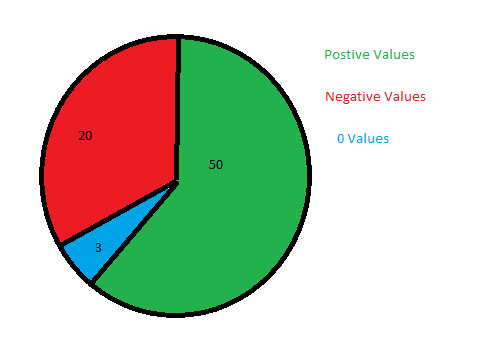
I have a Measured column that shows the variance between 2 columns..
Solved! Go to Solution.
Hi @StuartSmith ,
You can do a caluclation as follows:
NegaticveCnt = CALCULATE(DISTINCTCOUNT(tablename[Country]), tablename[GroupCol] = "Negative")
Do similar measures for Positive and 0.
Thanks,
Pragati
@StuartSmith ,
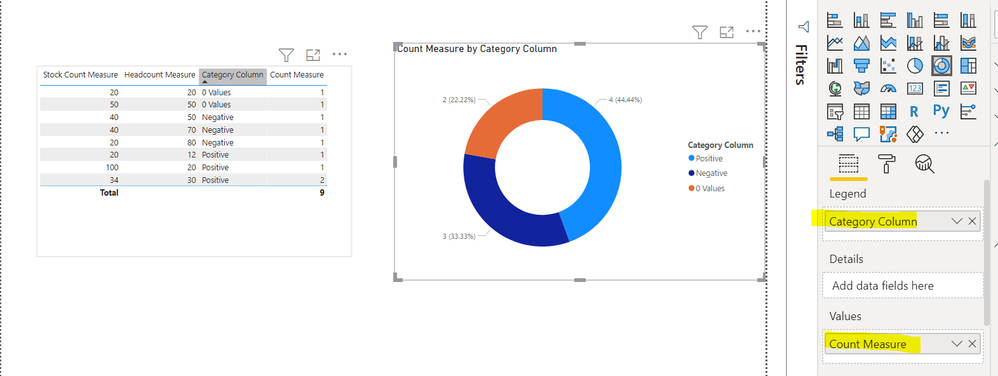
I replicated some sample at my end as per your deets.
SO create first one calculated column:
Hi @StuartSmith ,
You can try created a calculated column as follows to use on pie-chart:
GroupCalc = IF([Measure] = 0, "0 Values", IF([Measure] > 0, "Positive Values", "Negative Values"))
Replace [Measure] in above DAX with your measure/column.
Thanks,
Pragati
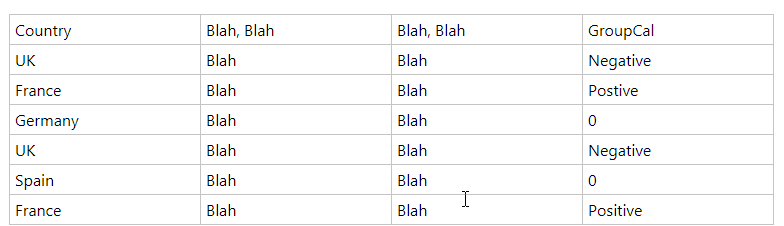
Thanks, your measure worked great, but then reaslied the result wasnt exactly what I wanted. I now have a table similar to the below
The chart is then conting each row, so Negative = 2, Positive = 2 & 0 = 1, but I realised that I need it to count each distinct country, so Negative = 1 (UK) , Positive = 1 (France) & 0 = 2 (Germany & Spain).
I am trying "DistinctCount" with your measure, but can figure it out. Hope that makes sense.
Hi @StuartSmith ,
You can do a caluclation as follows:
NegaticveCnt = CALCULATE(DISTINCTCOUNT(tablename[Country]), tablename[GroupCol] = "Negative")
Do similar measures for Positive and 0.
Thanks,
Pragati
Don't miss out on Data Days, June 15 through August 7. Learn Fabric, Power BI, SQL, AI and more.
Check out the May 2026 Power BI update to learn about new features.
| User | Count |
|---|---|
| 21 | |
| 21 | |
| 21 | |
| 19 | |
| 12 |
| User | Count |
|---|---|
| 59 | |
| 53 | |
| 40 | |
| 30 | |
| 26 |