Share feedback directly with Fabric product managers, participate in targeted research studies and influence the Fabric roadmap.
Sign up nowGet Fabric certified for FREE! Don't miss your chance! Learn more
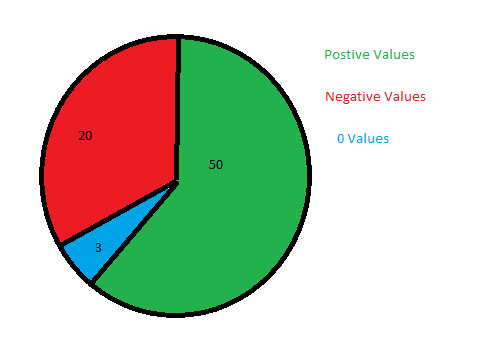
I have a Measured column that shows the variance between 2 columns..
Solved! Go to Solution.
Hi @StuartSmith ,
You can do a caluclation as follows:
NegaticveCnt = CALCULATE(DISTINCTCOUNT(tablename[Country]), tablename[GroupCol] = "Negative")
Do similar measures for Positive and 0.
Thanks,
Pragati
@StuartSmith ,
I replicated some sample at my end as per your deets.
SO create first one calculated column:
Hi @StuartSmith ,
You can try created a calculated column as follows to use on pie-chart:
GroupCalc = IF([Measure] = 0, "0 Values", IF([Measure] > 0, "Positive Values", "Negative Values"))
Replace [Measure] in above DAX with your measure/column.
Thanks,
Pragati
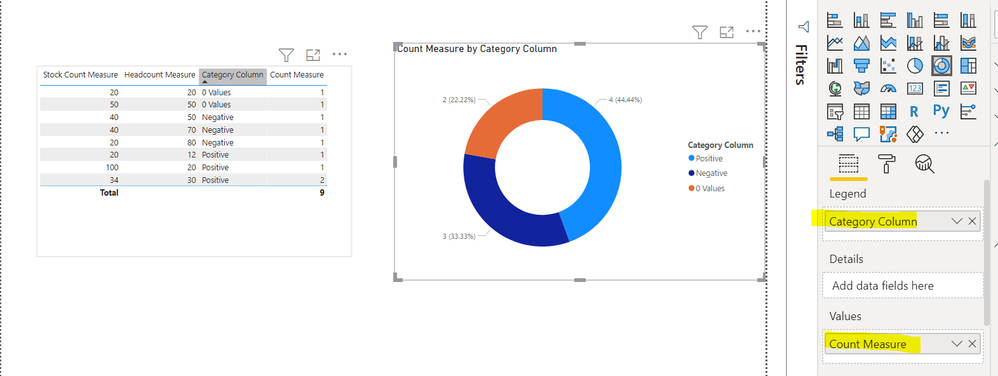
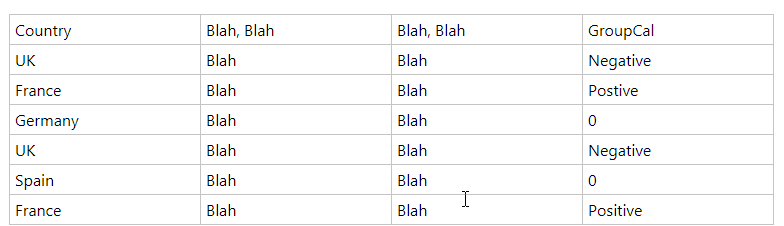
Thanks, your measure worked great, but then reaslied the result wasnt exactly what I wanted. I now have a table similar to the below
The chart is then conting each row, so Negative = 2, Positive = 2 & 0 = 1, but I realised that I need it to count each distinct country, so Negative = 1 (UK) , Positive = 1 (France) & 0 = 2 (Germany & Spain).
I am trying "DistinctCount" with your measure, but can figure it out. Hope that makes sense.
Hi @StuartSmith ,
You can do a caluclation as follows:
NegaticveCnt = CALCULATE(DISTINCTCOUNT(tablename[Country]), tablename[GroupCol] = "Negative")
Do similar measures for Positive and 0.
Thanks,
Pragati
Share feedback directly with Fabric product managers, participate in targeted research studies and influence the Fabric roadmap.
| User | Count |
|---|---|
| 63 | |
| 62 | |
| 42 | |
| 19 | |
| 16 |
| User | Count |
|---|---|
| 118 | |
| 106 | |
| 38 | |
| 28 | |
| 27 |